
TerminalDepot
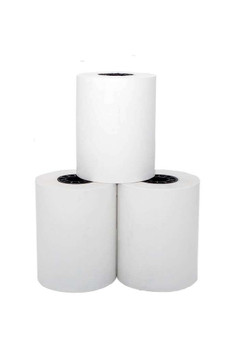
PAX A920Pro Thermal Paper Rolls 2 1/4" x 50' | American Made

- SKU:
- PPRPAXA920P
- UPC:
- 7061289787917
- MPN:
- PPRPAXA920P
- Condition:
- New

Description
PAX A920Pro Thermal Paper | Premium American-Made Receipt Rolls
Premium American-made thermal paper rolls sized specifically for the PAX A920Pro smart terminal. Each roll measures 2 1/4" x 50' and prints crisp, smear-free receipts every time. BPA-free formulation keeps your staff and customers safe.
These rolls are manufactured in the USA using high-grade thermal coating that resists fading, heat damage, and humidity. Your receipts stay legible for years. No cheap imports that jam your printer or fade in weeks.
Key Features
- ✅ Guaranteed fit for PAX A920Pro smart terminal
- ✅ BPA-free thermal paper - safe for customers and staff
- ✅ No ink or ribbon needed - thermal printing
- ✅ Red end-of-roll warning stripe
- ✅ 2 1/4" x 50' rolls - maximum length for the A920Pro
- ✅ American made - manufactured in the USA
- ✅ Lint-free coating protects the print head
- ✅ Crisp, smear-free receipt printing
| Paper Type: | Thermal (no ribbon or ink needed) |
| Roll Size: | 2 1/4" x 50' (58mm x 15.24m) |
| Core Size: | 1/2" (13mm) |
| Roll Diameter: | 36mm |
| Paper Weight: | 55gsm thermal |
| BPA-Free: | Yes |
| Made in: | USA |
| SKU: | PPRPAXA920P |
▶ About the PAX A920Pro
The PAX A920Pro is an Android-based smart terminal used by restaurants, retail stores, and mobile businesses for payment processing. It features a touchscreen display, built-in thermal printer, and supports WiFi, Bluetooth, and 4G connectivity. The internal printer accepts 2 1/4" wide thermal paper with a maximum roll diameter of 36mm.
Because the A920Pro is a handheld device with a compact paper compartment, using the correct roll diameter is critical. Oversized rolls will not fit and can damage the printer lid or feed mechanism.
▶ Why American-Made Paper Matters
Imported thermal paper often uses inconsistent coating thickness. This causes light prints, faded receipts, and paper dust buildup inside the print head. Over time, that dust leads to streaking, misfeeds, and premature print head failure.
American-made thermal paper uses a uniform coating process with strict quality control. The result is clean, consistent prints from the first receipt to the last inch of every roll. You also avoid BPA and other harmful chemicals that are still common in overseas paper production.
Your PAX A920Pro print head is expensive to replace. Protecting it with quality paper is the cheapest maintenance you can do.
▶ How to Load Paper in the PAX A920Pro
1. Locate the paper compartment latch on the back of the terminal.
2. Press the latch and lift the printer cover open.
3. Remove any empty core or partial roll.
4. Drop the new roll into the compartment with the paper feeding from the bottom of the roll (thermal side facing outward).
5. Pull a small amount of paper past the tear bar and close the lid until it clicks.
6. Print a test receipt to confirm proper feed direction. If the receipt prints blank, flip the roll over.
▶ Signs You Are Using Low-Quality Paper
⚠️ Receipts fade within days or weeks of printing.
⚠️ Light or uneven print across the receipt width.
⚠️ Paper dust or white residue visible inside the printer compartment.
⚠️ Frequent paper jams or misfeeds.
⚠️ Receipts turn fully black when exposed to heat (unstable coating).
⚠️ Strong chemical smell from the paper surface.
If you notice any of these issues, switch to American-made thermal paper immediately. Continued use of low-quality paper can permanently damage the thermal print head.
▶ What Is Included
✅ Thermal paper rolls (quantity depends on pack size selected)
✅ Each roll: 2 1/4" x 50', 1/2" core, 36mm diameter
✅ BPA-free, made in USA
❌ Ribbon or ink cartridge NOT included (not needed. thermal paper does not use ribbon)
❌ Terminal NOT included
▶ Compatibility
✅ PAX A920Pro
Also Works With: Any 2 1/4" thermal printer that accepts a 1/2" core roll with 36mm maximum diameter.
▶ Troubleshooting
Blank receipts: The roll is loaded upside down. Open the cover, flip the roll so thermal side faces outward, and reclose.
Paper not feeding: Make sure the roll spins freely in the compartment. Check for torn paper caught under the roller. Confirm the lid is fully latched.
Faded or light print: Replace with fresh American-made paper. If the issue continues with new paper, the print head may need cleaning or replacement.
Paper jamming: Do not use rolls wider than 2 1/4" or with a diameter larger than 36mm. Remove any jammed paper gently without pulling against the feed direction.
▶ Other Supplies for the PAX A920Pro
Paper Roller Assembly. Replacement printer covers. Screen protectors. Charging bases. Check our PAX accessories collection for compatible parts.
 Attention CA Residents: Prop 65 Warning
Related Products
Related Products

PAX A920 Thermal Receipt Paper Rolls | 2-1/4" x 50ft
TerminalDepot
First Data FD150 Thermal Paper Rolls 2 1/4" x 50' - BPA-Free American Made
TerminalDepot

2 1/4" x 50' Thermal Paper Rolls
TerminalDepot

PAX P90 Thermal Paper Rolls
TerminalDepot

PAX S920 Thermal Paper Rolls
TerminalDepot