
VeriFone
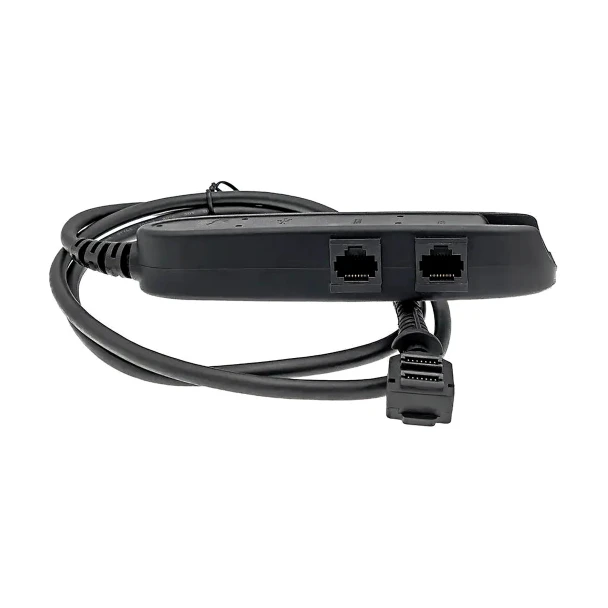
VeriFone P400 / P200 Ethernet / RS232 / Mini-USB Dongle Cable 1m | OEM CBL435-005-02-A
- SKU:
- CBL435-005-02-A
- MPN:
- CBL435-005-02-A
- Condition:
- New


Description
VeriFone P400 / P200 Ethernet, RS232 and Mini-USB Dongle Cable - OEM Part CBL435-005-02-A
A P400 or P200 on Ethernet is the setup that keeps a lane independent of the PC: the PIN pad talks to the network on its own, with its own power. This is the genuine VeriFone dongle cable that makes that possible. The 1m lead plugs into the 28-pin port on the pad and ends in a junction box with an RJ45 Ethernet jack, an RJ45 RS232 jack, a mini-USB port and a DC jack for the VeriFone power pack. One cable, every connection the pad supports.
No stacking adapters. No guessing which port is which. It is the exact part number VeriFone lists for the P400 and P200, and the fitment on this page was checked against VeriFone's own documentation rather than copied from another listing, so what arrives is the cable your pad was designed for. Fast shipping. Most US deliveries arrive in 2-4 business days.
Key Features
- ✅ Genuine VeriFone OEM dongle, part CBL435-005-02-A, listed by VeriFone for the P400 and P200
- ✅ Fits the VeriFone P400, P400 Plus and P200, P200 Plus PIN pads
- ✅ RJ45 Ethernet jack puts the pad directly on the LAN for IP-connected lanes and semi-integrated setups
- ✅ Second RJ45 jack carries RS232 serial for hosts that still drive the pad over a COM port
- ✅ Mini-USB port gives a USB connection to a host or service PC without swapping cables
- ✅ DC jack takes the VeriFone 12V power pack so the pad runs at full power for contactless and video
- ✅ Junction box sits on the counter or behind it, keeping the strain off the pad's connector
Specifications
| OEM Part Number: | CBL435-005-02-A |
| Compatible PIN Pads: | VeriFone P400, P400 Plus, P200, P200 Plus |
| Cable Type: | Multi-port dongle cable (Ethernet, RS232, mini-USB, power) |
| Length: | 1m (3.3 ft), pad to junction box |
| PIN Pad End: | 28-pin VeriFone multi-port connector, secured under the compartment cover |
| Junction Box Ports: | RJ45 Ethernet, RJ45 RS232, mini-USB, DC power jack |
| Power: | 12V DC via the jack on the junction box, VeriFone power pack sold separately |
| Condition: | New - OEM Original |
| Brand: | VeriFone |
▶ What This Cable Does and When You Need It
The P400 and P200 have one multi-port connector on the back, so every connection type comes through a cable. VeriFone describes this part as the P400/P200 Ethernet and mini-USB dongle: it breaks that one port out into a small junction box with Ethernet, RS232, mini-USB and a power input. It is the cable to use when the pad needs to be on the network, or when you want one cable that covers more than one host type.
• Your P400 or P200 arrived with no cable. VeriFone ships PIN pads bare, and the cable is always a separate line item.
• Your processor or POS integration expects the pad on the LAN with its own IP address.
• You have a mix of lanes, some serial and some IP, and want one cable part number on the shelf.
• The original dongle is cracked at the junction box or the pad reboots because the DC jack has gone loose.
▶ Compatible Terminals
• VeriFone P400 and P400 Plus - listed in VeriFone's P400 accessories table
• VeriFone P200 and P200 Plus - same part, named for both models by VeriFone
Not for the VX820, VX805 or M400. The 435 series is the P-line cable family; the older VX-series pads use the 282 series cables.
▶ How to Install
1. Power down the host. Do not connect the power pack yet.
2. Open the cable compartment on the back of the pad by loosening the captive screw and sliding the cover off.
3. Seat the 28-pin connector fully, slide the cover back, and tighten the screw so the cover clamps the cable.
4. Connect your network cable to the RJ45 Ethernet jack, or your serial or USB lead to the matching port on the box.
5. Connect the VeriFone power pack to the DC jack last, then plug it in. The pad powers on.
▶ Troubleshooting
• Pad does not power on: the power pack is not connected or not seated. Ethernet and serial supply no power, so the pack is required.
• Pad powers on but never gets an IP address: confirm the network cable is in the Ethernet jack, not the RS232 jack. Both are RJ45 and sit side by side.
• Pad reboots during transactions: the DC plug is loose in the jack or the power pack is the wrong rating. Use the VeriFone 12V pack.
• Contactless or video features are missing: the pad is under-powered. Confirm the power pack is connected rather than relying on USB.
▶ What's Included
• One VeriFone CBL435-005-02-A dongle cable, 1m, with junction box
Not included: PIN pad, network cable, serial or USB lead, VeriFone 12V power pack (required, sold separately).
▶ Why the Genuine Cable Matters
The 28-pin connector and the port breakout are VeriFone's own design. A copy that gets a pin or the power routing wrong can leave the pad rebooting mid-sale or dropping off the network, and a cable sold under the wrong part number leaves you with a box that does not fit. This is the part VeriFone tested with these pads, sourced through authorized VeriFone distribution, with the part number on your invoice for procurement records.
The cable is the cheapest piece of the lane and the one that fails most often. Fitting the right one the first time is what keeps a lane taking cards, and the matching USB and serial cables for the same pads are linked below so a mixed lane can be wired from a single order.
▶ Other VeriFone Cables and Accessories
• VeriFone P400 / P200 / VX820 / VX805 USB Cable 3m (CBL282-038-02-B)
• VeriFone P400 / P200 / VX820 / VX805 Serial Cable 6 ft or 10 ft (CBL282-031-02-A)
 Attention CA Residents: Prop 65 Warning
Related Products
Related Products

VeriFone P400 / P200 / VX820 / VX805 Ethernet RS232 Dongle Cable 1m | OEM CBL282-006-01-B
VeriFone

VeriFone P400 / P200 / VX820 / VX805 USB Cable 3m (9.8 ft) | OEM CBL282-038-02-B
VeriFone

VeriFone vx680 USB Ethernet Dongle
VeriFone

VeriFone P400 / P200 Privacy Shield
VeriFone

VeriFone MX915 / MX925 Ethernet (RJ45) to USB Cable | OEM | 1m, 3m, 5m
VeriFone





