
TerminalDepot
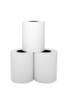
First Data FD150 Thermal Paper Rolls 2 1/4" x 50' - BPA-Free American Made

- SKU:
- PPRFD150
- UPC:
- 713807153366
- MPN:
- PPRFD150
- Condition:
- New
- Availability:
- In Stock, usually ships Same Business Day.



Description
First Data FD150 Thermal Paper Rolls: American-Made 2 1/4" x 50' BPA-Free Receipt Paper
American-made thermal paper rolls for the First Data FD150 payment terminal. These 2 1/4" x 50' rolls are BPA-free and BPS-free, manufactured in the United States with strict quality standards. Each roll delivers clean, high-contrast prints with smooth feeding and no jams. The FD150 has a compact paper bay that requires the shorter 50-foot roll length.
Key Features
- ✅ Guaranteed perfect fit for the First Data FD150
- ✅ 2 1/4" x 50' thermal paper (58mm width)
- ✅ American made. Not imported. Premium US manufacturing with strict quality standards
- ✅ BPA-free AND BPS-free. Safe for employees and customers who handle receipts daily
- ✅ High-contrast black printing that stays legible for returns, chargebacks, and recordkeeping
- ✅ Smooth, consistent feed with no jams, misfeeds, or paper dust
- ✅ MPN: PPRFD150
Specifications
| Paper Type: | Direct Thermal |
| Width: | 2 1/4" (58mm) |
| Length: | 50 feet |
| Core Size: | 7/16" standard core |
| Color: | White |
| Print Method: | Direct Thermal (no ink or ribbon required) |
| BPA-Free: | Yes (also BPS-free) |
| MPN: | PPRFD150 |
| Compatible Terminal: | First Data FD150 |
| Made In: | United States |
▶ About the First Data FD150
The First Data FD150 is a countertop payment terminal used in retail stores, restaurants, salons, and small businesses. It processes credit cards, debit cards, and contactless payments. The terminal has a built-in thermal printer with a compact paper bay that accepts 2 1/4" wide thermal paper rolls. The shorter 50-foot roll length is required because the paper compartment is smaller than full-size receipt printers.
The FD150 prints customer receipts and merchant copies directly. No ink, ribbon, or toner is needed. The thermal printhead applies heat to the paper surface to create the text and images on the receipt.
▶ Why BPA-Free and BPS-Free Matters
Traditional thermal paper is coated with bisphenol A (BPA), a chemical that transfers to skin on contact. Cashiers, servers, and retail workers who handle dozens or hundreds of receipts per shift absorb BPA through their skin throughout the day. Some manufacturers switched from BPA to BPS (bisphenol S), but studies show BPS raises similar health concerns.
These rolls are free of both BPA and BPS. This matters for any business with employees who handle receipts regularly. It also matters for customer-facing businesses where receipts are handed directly to customers. Several states have introduced or passed legislation restricting BPA in thermal paper, making BPA-free rolls a practical compliance step as well.
▶ Why American-Made Paper Matters
Imported thermal paper is cheaper for a reason. Common problems with imported rolls include:
- Inconsistent roll lengths. A roll advertised as 50 feet may actually measure 38 to 45 feet. You get fewer receipts per roll and burn through cases faster
- Lower quality thermal coating. The chemical coating on cheap imports is thinner or unevenly applied. This causes faded prints, uneven darkness across the receipt, and prints that become unreadable within weeks
- Higher lint and paper dust. Low-grade paper sheds more fibers during printing. This dust accumulates on the thermal printhead and causes print quality degradation, streaking, and eventually printhead damage
- BPA and BPS concerns. Some imported rolls still contain BPA or BPS despite being labeled "BPA-free." US manufacturing standards and supply chain transparency reduce this risk
- Supply chain risk. Imported paper is subject to shipping delays, port congestion, and tariff changes. US-manufactured paper ships domestically with predictable lead times
TerminalDepot paper is manufactured in the United States. Every roll meets consistent length, coating quality, and safety standards. American made. Not imported.
▶ How to Load Paper in the First Data FD150
- Locate the paper cover on the back top portion of the terminal
- Press the release latch or pull the cover open to expose the paper bay
- Remove the empty core
- Place the new roll into the bay with the paper feeding from the bottom of the roll (paper unrolls toward you from underneath)
- Pull a short length of paper out past the tear edge
- Close the cover firmly until it clicks shut
If the paper feeds but prints blank, the roll is loaded backwards. Flip the roll over so the thermal-coated side (the slightly glossy side) faces the printhead.
▶ Signs You're Using Low-Quality Paper
- Faded or light printing. The thermal coating is too thin or unevenly applied. Good paper produces consistent, high-contrast black text across the entire receipt
- Receipts that fade within days or weeks. Poor thermal coating breaks down quickly when exposed to light, heat, or humidity. Quality American-made paper holds print for years under normal storage conditions
- Paper dust on the printhead. If you see white residue building up inside the paper bay, the paper is shedding lint. This accelerates printhead wear and causes streaks in the print
- Frequent paper jams. Inconsistent paper thickness or rough edges cause the paper to catch, fold, or misfeed during printing. In a compact terminal like the FD150, jams are especially disruptive because the paper path is tight
- Rolls that run out faster than expected. If you are replacing rolls more often than usual, the rolls may be shorter than advertised
▶ Storage and Print Longevity
Thermal paper is sensitive to heat, light, and humidity. To maximize the life of both unused rolls and printed receipts:
- Store unused rolls in a cool, dry place away from direct sunlight. Ideal conditions are below 77°F (25°C) with less than 65% relative humidity
- Keep printed receipts away from heat sources, direct sunlight, and plastic sleeves or folders (plasticizers in PVC can react with the thermal coating)
- Do not store receipts in car dashboards, near kitchen heat lamps, or in direct window light. Heat and UV exposure accelerate fading
- For long-term records, make a photocopy or digital scan of the receipt. Thermal prints are not permanent and will fade over time regardless of paper quality, but American-made paper with quality thermal coating lasts significantly longer than imports
▶ What's Included
In the box:
- ✅ First Data FD150 thermal paper rolls, 2 1/4" x 50', BPA-free and BPS-free
NOT included (use your existing supplies):
- ⚠️ Terminal (First Data FD150)
- ⚠️ No ink or ribbon needed. Thermal printers use heat, not ink
▶ First Data FD150 Compatibility
Compatible With
- ✅ First Data FD150
Also Works With Other 2 1/4" Thermal Terminals
Any payment terminal or thermal printer that accepts 2 1/4" (58mm) wide paper with a standard core and 50-foot roll length can use these rolls. Many countertop payment terminals from various manufacturers use this same paper size.
NOT Compatible With
- ❌ First Data FD130 / FD130 Duo (uses 2 1/4" x 85' rolls, different length)
- ❌ Terminals that require 3 1/8" (80mm) paper
- ❌ Terminals that require coreless rolls
▶ Troubleshooting Common FD150 Paper Issues
- Printing is blank? The paper is loaded backwards. The thermal coating (slightly glossy side) must face the printhead. Remove the roll, flip it over, and reload
- Faded or light printing? Clean the printhead with a thermal printhead cleaning pen or isopropyl alcohol on a lint-free cloth. If still faded after cleaning, the paper quality may be the issue. Switch to American-made thermal paper
- Paper jams frequently? Check that the roll is seated properly and the paper path is clear. The FD150 has a compact paper bay, so ensure the roll is not too large in diameter for the compartment. Remove any torn paper fragments from previous jams
- Terminal shows paper error? Make sure the roll is fully seated in the bay and the cover is completely closed. If the roll is nearly empty, the terminal may detect a low-paper condition. Replace with a new roll
- Receipts curling excessively? Some curl is normal with thermal paper. Excessive curling usually indicates the paper was stored in a humid environment. Store paper in a climate-controlled area
▶ Other First Data FD150 Supplies
- First Data FD150 Thermal Paper Rolls 2 1/4" x 50' (this product) - PPRFD150
- First Data FD150 Power Supply
- First Data FD150 Paper Roller Assembly
Check our full First Data accessories catalog for all compatible supplies and replacement parts.
3 Reviews
-
Good Quality
We have a ton of credit card sales, but many companies are thinning out their paper, and it's getting thrown around in the credit card machine itself. We needed a quality paper that not only took on print well, but it had to be sturdy enough to provide a quality receipt without it being too thick and bulky, too. This is the right fit. Thank you!
-
Fast delivery
Affordable price and fast delivery. Highly recommend.
-
Credit card receipt paper
Great product. Great value.
 Attention CA Residents: Prop 65 Warning
Related Products
Related Products

Square Terminal Thermal Paper Rolls 2 1/4" x 50' - BPA-Free American Made (SPD2-01)
TerminalDepot

Star TSP100 Thermal Paper Rolls 3 1/8" x 230' BPA-Free American Made
TerminalDepot

Ingenico Desk 3500 Thermal Paper Rolls 2 1/4" x 50' | BPA-Free Receipt Paper
TerminalDepot

First Data FD150 Paper Roller Assembly
First Data

First Data FD100 Thermal Paper Rolls
TerminalDepot