
VeriFone
VeriFone M400 / M424 / M425 / M440 / M450 Ice Cube Ethernet Cable | OEM MSC445-010-00-A
- SKU:
- MSC445-010-00-A
- MPN:
- MSC445-010-00-A
- Condition:
- New
- Availability:
- In Stock


Description
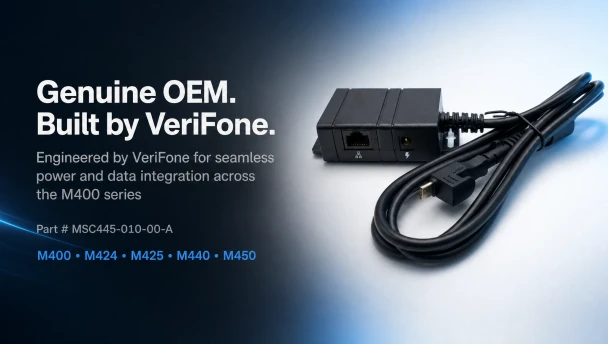
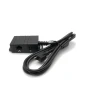
VeriFone M400 / M424 / M425 / M440 / M450 Ice Cube Ethernet Cable - OEM MSC445-010-00-A
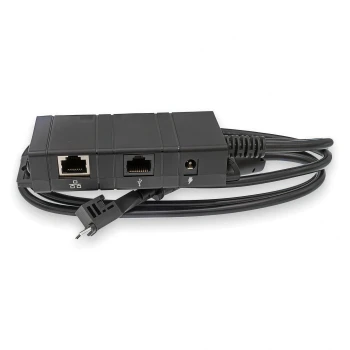
Your VeriFone M400-series terminal processes every tap, dip, and swipe your business depends on. The Ice Cube Ethernet cable is the module that connects it to your network and gives it power. When this cable fails or goes missing, the terminal goes offline and transactions stop. This is the genuine OEM replacement - part MSC445-010-00-A - built by VeriFone specifically for the M400, M424, M425, M440, and M450 terminals.
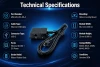
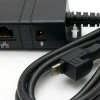
The Ice Cube module slides into the recessed bay on the upper back of the terminal and locks into place with an audible click. One end connects to your terminal via USB-C. The other end provides an RJ45 Ethernet port for your network connection and a DC power port for the separate power supply (PWR445-001-01-A, sold separately). No adapters, no workarounds - direct OEM fit.
Key Features
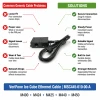
- ✅ Genuine OEM VeriFone cable - exact factory replacement for 5 terminal models
- ✅ RJ45 Ethernet port provides wired network connectivity when Wi-Fi is not reliable enough for payment processing
- ✅ DC power port accepts the VeriFone power supply (PWR445-001-01-A) to keep the terminal charged and running
- ✅ USB-C connector plugs directly into the terminal - no adapters or dongles needed
- ✅ Slide-in locking mount snaps securely into the terminal with an audible click - no tools required
- ✅ 3ft (1m) cable length gives enough reach without excess cable clutter at the counter
- ✅ Compatible with all five M4xx models: M400, M424, M425, M440, and M450
Specifications
| Compatible Terminals: | VeriFone M400, M424, M425, M440, M450 |
| OEM Part Number: | MSC445-010-00-A |
| Cable Type: | Ice Cube Ethernet Cable Assembly |
| Data Connection: | RJ45 Ethernet Port |
| Power Connection: | DC Power Port (barrel jack) |
| Terminal Connector: | USB-C |
| Cable Length: | 3 ft (1m) |
| Mounting: | Slide-in locking mount (upper back of terminal) |
| Condition: | New - OEM Original |
| Brand: | VeriFone |
▶ What Is the Ice Cube Module and What Does It Do?
The Ice Cube is a compact connectivity module designed by VeriFone for M400-series terminals. It provides wired Ethernet connectivity and a power input in a single module that attaches to the back of the terminal. The module gets its name from its small, cube-shaped form factor. Without it, the terminal relies on Wi-Fi or Bluetooth only. With it, you get a dedicated wired network connection that is faster and more reliable for payment processing in high-volume environments.
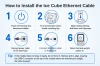
▶ How to Install the Ice Cube Ethernet Cable
1. Power off the terminal and disconnect any existing cables.
2. Turn the terminal face-down and locate the rectangular mounting bay on the upper back.
3. Align the Ice Cube module with the bay at the top edge and slide downward until the plastic retention clip snaps into place (you will hear an audible click).
4. Connect your Ethernet cable to the RJ45 port (network icon).
5. Connect the power supply cable to the DC barrel jack port (bolt icon).
6. Return the terminal to upright position and power on.
Tip: If the module does not snap in smoothly, do not force it. Remove, re-align, and try again. The USB-C connector enters straight. No tools are required.
▶ Ethernet vs. USB Ice Cube - Which One Do I Need?
VeriFone makes two Ice Cube cables for the M400 series. This one (MSC445-010-00-A) provides an Ethernet (RJ45) connection for wired network access. The USB version (MSC445-006-00-A) provides a USB data connection instead. Choose Ethernet if your POS system connects to the terminal over your local network. Choose USB if your POS system connects directly to the terminal via USB. Both versions include a DC power port for the power supply. If you need both Ethernet and USB, VeriFone makes a combo module (MSC445-011-00-A) that provides both ports in one Ice Cube.
▶ What Else Do I Need?
The Ice Cube Ethernet cable does not include a power supply. You will need the VeriFone M400/M440/M450 Power Supply (part PWR445-001-01-A, sold separately) to provide power through the DC barrel jack on the module. You will also need a standard Ethernet cable (not included) to connect from the RJ45 port to your network switch or router.
▶ Troubleshooting
Terminal not powering on after installation: Confirm the power supply (PWR445-001-01-A) is plugged into the DC port on the Ice Cube module, not directly into the terminal. The Ice Cube routes power through USB-C to the terminal.
No network connection: Check that the Ethernet cable is fully seated in the RJ45 port. Verify the other end connects to an active network port. Check for a link light on the module or your switch.
Module feels loose or won't click: Remove the module, inspect the mounting bay for debris, and re-insert from the top. The retention clip should snap audibly. If the clip is damaged, the module may need replacement.
Terminal does not recognize the module: Power cycle the terminal after installing the Ice Cube. Some configurations require a restart to detect wired connectivity.
▶ Compatible Terminals
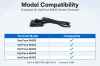
This Ice Cube Ethernet Cable (MSC445-010-00-A) fits the following VeriFone terminals:
✅ VeriFone M400
✅ VeriFone M424
✅ VeriFone M425
✅ VeriFone M440
✅ VeriFone M450
This cable does NOT fit older VeriFone models (VX series, V200/V400 series) or non-M4xx terminals. Those terminals use different cable assemblies.
 Attention CA Residents: Prop 65 Warning
Related Products
Related Products

VeriFone M400 / M424 / M425 / M440 / M450 Ice Cube USB Cable | OEM MSC445-006-00-A
VeriFone
VeriFone M400 / M424 / M425 / M440 / M450 Ice Cube Ethernet + USB Cable | OEM MSC445-011-00-A
VeriFone

VeriFone M400 / M440 FirstBase Mount
Tailwind

VeriFone M400 / M440 / M445 Power Supply
VeriFone
VeriFone M400 M440 Conversion Kit for ENS Low Contour Stand
HAVIS





