
VeriFone
VeriFone M400 / M424 / M425 / M440 / M450 Ice Cube USB Cable | OEM MSC445-006-00-A

- SKU:
- MSC445-006-00-A
- MPN:
- MSC445-006-00-A
- Condition:
- New





Description
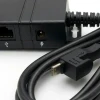
VeriFone M400 / M424 / M425 / M440 / M450 Ice Cube USB Cable Assembly - OEM Part MSC445-006-00-A
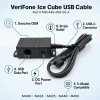
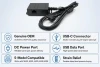
The MSC445-006-00-A is the genuine VeriFone USB Ice Cube cable assembly for the entire M4xx multilane terminal family: M400, M424, M425, M440, and M450. One end connects to the terminal's multiport via USB-C. The other end breaks out into an Ice Cube USB module (connects to your POS, ECR, or PC) and a DC power port (accepts the VeriFone M4XX power pack, sold separately). One cable handles both data and power through a single connection point at the back of the terminal.
If you are setting up a new lane, replacing a damaged cable, or swapping out a terminal, this is the genuine OEM cable designed for the terminal. Genuine VeriFone construction means the USB-C seat and multiport connector are built to the terminal's tolerances. No adapter workarounds, no intermittent disconnects, no guessing whether the pinout matches.
Key Features
- ✅ Genuine VeriFone OEM cable - built to exact terminal tolerances, no connection intermittency
- ✅ Single USB-C multiport connection carries both USB data and power to the terminal
- ✅ Ice Cube USB module connects directly to your POS system, ECR, or PC
- ✅ DC power port accepts the VeriFone M4XX power pack (sold separately)
- ✅ 3 ft (1 m) length keeps the lane clean without excess slack
- ✅ Verified fit for the complete VeriFone M4xx family: M400, M424, M425, M440, M450
- ✅ Drop-in replacement - genuine VeriFone OEM cable, not a third-party substitute
Specifications
| OEM Part Number: | MSC445-006-00-A |
| Cable Type: | Ice Cube USB Cable Assembly |
| Length: | 3 ft (1 m) |
| Terminal Connector: | USB-C (plugs into multiport) |
| Breakout: | USB module + DC power port |
| Compatible Terminals: | VeriFone M400, M424, M425, M440, M450 |
| Condition: | New - OEM Original |
| Brand: | VeriFone |
▶ What This Cable Does
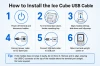
The Ice Cube system is VeriFone's modular connectivity platform for the Engage M4xx multilane terminal family. Instead of running separate cables for data and power, the Ice Cube cable carries everything through a single USB-C connection at the multiport on the back of the terminal. The MSC445-006-00-A is the USB-only variant. It breaks out into a USB module that connects to your POS system and a DC power port where you plug in the M4XX power pack (sold separately). The terminal draws power through this same cable, so there is no separate power cord running to the unit itself.
▶ When You Need This Cable
New lane deployment where the terminal was purchased without a cable. Replacing a cable that has been damaged, pinched under a counter mount, or developed intermittent disconnects. Swapping an older terminal for a new M4xx and reusing existing infrastructure. If your current setup only needs USB connectivity to the POS (no Ethernet required), this is the correct cable.
▶ Compatible Terminals
This cable fits every terminal in the VeriFone Engage M4xx multilane family: M400, M424, M425, M440, and M450. All five use the same Ice Cube modular system and the same USB-C multiport connection. Compatibility is documented in each terminal's official VeriFone installation guide.
▶ Choosing the Right Ice Cube Cable
VeriFone makes several Ice Cube cable variants for the M4xx family. The MSC445-006-00-A (this product) provides USB connectivity only. If your POS setup requires a hardwired Ethernet connection in addition to USB, VeriFone offers Ethernet-only and combination USB/Ethernet Ice Cube cables under separate part numbers. Choose based on what your lane infrastructure requires at the terminal location.
▶ What's Included and What's Not
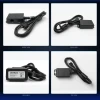
Included: one VeriFone MSC445-006-00-A Ice Cube USB cable assembly (USB module, DC power port, USB-C connector, 3 ft cable). NOT included: VeriFone M4XX DC power pack. The power pack plugs into the DC port on this cable and is required to power the terminal. If you do not already have a power pack, order one separately.
▶ Troubleshooting
Terminal not powering on: confirm the M4XX power pack is plugged into the DC port on the Ice Cube module and the AC adapter is connected to a live outlet. POS not detecting the terminal: verify the USB module is connected to a working USB port on the POS/ECR/PC. Try a different USB port. Check that the USB-C connector is fully seated in the multiport at the back of the terminal. If the terminal powers on but drops connection intermittently, inspect the USB-C connector and multiport for debris or damage. A damaged cable should be replaced rather than repaired.
▶ Why Use Genuine VeriFone OEM Cables
The Ice Cube multiport is not a standard USB-C port. It carries power and data through a proprietary pinout designed for the M4xx terminal family. A generic USB-C cable will not deliver power to the terminal and may not establish a data connection at all. OEM cables are built to VeriFone's connector tolerances and carry the correct pin assignments. Using the genuine cable avoids intermittent connection issues, failed transactions at the lane, and unnecessary service calls.
 Attention CA Residents: Prop 65 Warning
Related Products
Related Products
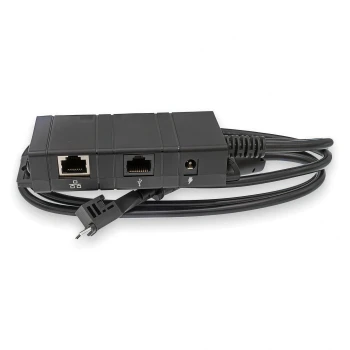
VeriFone M400 / M424 / M425 / M440 / M450 Ice Cube Ethernet + USB Cable | OEM MSC445-011-00-A
VeriFone
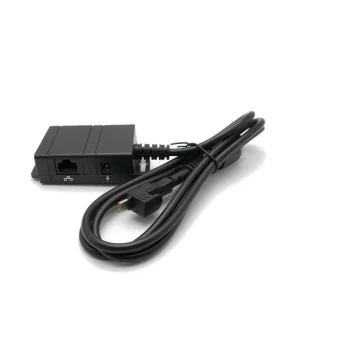
VeriFone M400 / M424 / M425 / M440 / M450 Ice Cube Ethernet Cable | OEM MSC445-010-00-A
VeriFone

VeriFone M400 / M440 FirstBase Mount
Tailwind

VeriFone M400 / M440 / M445 Power Supply
VeriFone
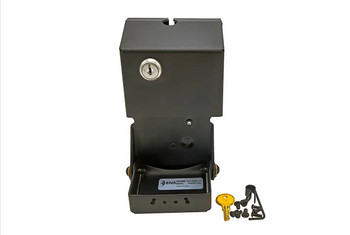
VeriFone M400 M440 Conversion Kit for ENS Low Contour Stand
HAVIS





