
VeriFone
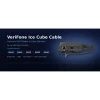
VeriFone M400 / M424 / M425 / M440 / M450 Ice Cube Ethernet + USB Cable | OEM MSC445-011-00-A

- SKU:
- MSC445-011-00-A
- MPN:
- MSC445-011-00-A
- Condition:
- New
- Availability:
- In Stock






Description
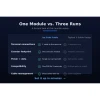
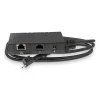
Ice Cube Ethernet + USB Cable for VeriFone M400, M424, M425, M440, M450 - One Module, Three Connections
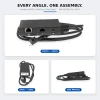
Your M4xx terminal is the last stop of every sale - the tap, the dip, the receipt. The one thing that takes it offline is the connection behind the counter. This genuine VeriFone Ice Cube assembly (OEM MSC445-011-00-A) carries your network link, POS data, and power through a single 3 ft (1m) cable run. It clicks in, locks down, and stays connected.
No adapters. No port juggling. No mystery third party pinouts. Just one genuine VeriFone assembly your terminal was designed around.
Key Features
- ✅ Genuine VeriFone OEM part MSC445-011-00-A - revision-matched fit with zero guesswork
- ✅ Ethernet, USB data, and DC power in one Ice Cube module - one cable run instead of three
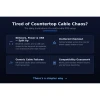
- ✅ Wired network link takes checkout off Wi-Fi, so payments do not stall when the signal dips
- ✅ USB-C terminal connector seats into all five M4xx multilane models
- ✅ Molded strain relief where the cable meets the module - survives daily counter movement
- ✅ Mounting tabs anchor the module so cable tugs do not unseat the ports
- ✅ 3 ft (1m) reach for clean counter routing
Specifications
| Compatible Models: | VeriFone M400, M424, M425, M440, M450 |
| OEM Part Number: | MSC445-011-00-A |
| Cable Type: | Ice Cube combo cable assembly |
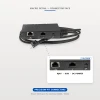
| Module Ports: | RJ45 Ethernet, USB data port, DC power jack |
| Terminal Connector: | USB-C |
| Length: | 3 ft (1m) |
| Condition: | New - OEM Original |
| Brand: | VeriFone |
▶ What This Cable Does
The Ice Cube module is the junction box for your terminal. The RJ45 Ethernet port connects to your router or switch for a wired network link. The USB data port connects to your POS host. The DC jack accepts power from the M4XX power pack. All three feed through the single USB-C connector into the terminal, so one cable handles what would otherwise take three separate runs.
▶ Which Ice Cube Cable Do I Need?
VeriFone makes three standard Ice Cube assemblies for the M4xx series:
• MSC445-006-00-A - USB data + power only. For terminals tethered to a POS host with no wired network.
• MSC445-010-00-A - Ethernet + power only. For terminals on a wired network with no USB host connection.
• MSC445-011-00-A (this cable) - Ethernet + USB data + power. For setups that need the network link and the POS host connection at the same time, or buyers who want one part that covers both.
▶ Installation
1. Power down the terminal and unplug the old assembly if one is installed.
2. Seat the USB-C connector into the port on the terminal.
3. Connect your Ethernet run to the module's RJ45 port and your POS host to the USB data port.
4. Connect the M4XX power pack to the DC jack and power up. The terminal boots as soon as power is present.
▶ Troubleshooting
• Terminal will not power on - check that the power pack is seated in the DC jack and the outlet is live.
• No network connection - reseat the RJ45 plug and confirm link lights at your router or switch.
• POS host does not detect the terminal - reseat the USB data connection and reboot the terminal.
• Intermittent drops that follow cable movement - the old assembly is likely worn. Swapping in a fresh OEM cable isolates the fault fast.
▶ What's Included and What's Not
✅ One genuine VeriFone Ice Cube Ethernet + USB cable assembly, MSC445-011-00-A.
❌ Power pack not included - the M4XX DC power pack (PWR445-001-01-A) is sold separately.
❌ Terminal not included. VeriFone terminals ship bare, which is why a cable assembly is the first accessory most M4xx owners order.
▶ Compatible Terminals
This assembly is listed in VeriFone's official installation guides for all five M4xx multilane terminals:
• VeriFone M400
• VeriFone M424
• VeriFone M425
• VeriFone M440
• VeriFone M450
 Attention CA Residents: Prop 65 Warning
Related Products
Related Products
VeriFone M400 / M424 / M425 / M440 / M450 Ice Cube Ethernet Cable | OEM MSC445-010-00-A
VeriFone

VeriFone M400 / M424 / M425 / M440 / M450 Ice Cube USB Cable | OEM MSC445-006-00-A
VeriFone

VeriFone M400 / M440 FirstBase Mount
Tailwind

VeriFone M400 / M440 / M445 Power Supply
VeriFone
VeriFone M400 M440 Conversion Kit for ENS Low Contour Stand
HAVIS





