
TerminalDepot
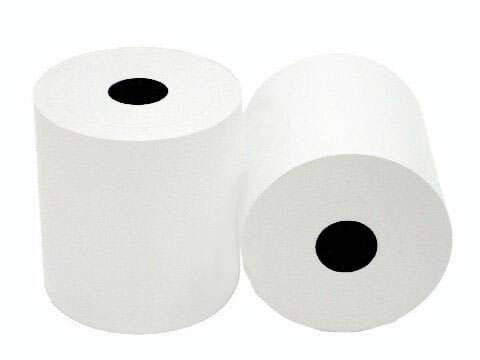
Clover Station Pro Thermal Paper 3 1/8 x 230 ft | BPA-Free American Made
- SKU:
- PPRCSPR
- UPC:
- 965697624635
- MPN:
- PPRCSPR
- Condition:
- New
- Availability:
- In Stock
Bulk discount rates
Below are the available bulk discount rates for each individual item when you purchase a certain amount
| Buy 3 - 5 | and get 5% off |
| Buy 6 or above | and get 8% off |

Description
Clover Station Pro Thermal Paper Rolls - American Made, BPA-Free
These rolls are the correct fit for the Clover Station Pro - 3 1/8" x 230', direct thermal, no ink or ribbon needed. They are manufactured in the United States, not imported. That means tighter quality control at the mill: consistent coating thickness, accurate roll lengths, and fewer jams from the uneven edges and loose windings that plague cheap imports.
Key Features
- ✅ Consistent 230-foot lengths - no short rolls that run out mid-rush
- ✅ Even thermal coating for dark, readable receipts - matters when you need a legible copy for a chargeback dispute
- ✅ Lint-free surface reduces print head debris and extends printer life
- ✅ Red end-of-roll warning stripe - you see it before the roll runs out mid-transaction
- ✅ BPA-free formulation for safe daily handling by staff and customers
- ✅ 50-roll case is the best per-roll value - stock up, reorder less
Specifications
| Roll Size: | 3 1/8" x 230' (80mm x 70m) |
| Core Size: | 1/2" |
| Paper Weight: | 48 GSM |
| Paper Type: | Single-Ply Direct Thermal |
| Color: | White |
| End-of-Roll Indicator: | Red warning stripe |
| BPA-Free: | Yes |
| Made In: | United States |
| Pack Sizes: | 6, 12, 18, 24, or 50 rolls |
| Compatible Printer: | Clover Station Pro |
▶ Compatible With Clover Station Pro
These rolls are sized for the Clover Station Pro, the current generation of the Clover Station countertop POS. If you run an older Clover Station, Station 2.0, Solo, or Duo, look for our Clover Station All Models paper listing which covers those terminals.
▶ How to Load Paper in the Clover Station Pro
Open the printer cover using the release on the printer base. Remove the empty core. Drop the new roll in so paper feeds from the bottom toward you. Pull a short length past the tear bar and close the cover until it clicks. If the printer feeds blank paper, the roll is backwards - flip it so the glossy thermal side faces the printhead. Scratch the paper with your fingernail to check: the side that leaves a dark mark is the print side.
▶ Storage and Handling
Store unused rolls in a cool, dry place out of direct sunlight, below 77F and under 65% humidity. Keep printed receipts away from heat, sunlight, and PVC plastic. For records you need long-term, make a photocopy or digital scan - all thermal images fade gradually over time.
 Attention CA Residents: Prop 65 Warning
Related Products
Related Products

Clover Flex Paper Roller Assembly
Clover

Credit Card / ATM Reader Cleaning Card
TerminalDepot

Clover Mini Gen 3 Thermal Paper Rolls
TerminalDepot
Clover Compact C801 Thermal Paper Rolls
TerminalDepot