
TerminalDepot
First Data FD150 Thermal Paper Rolls 2 1/4 x 85 ft | BPA-Free American Made

- SKU:
- PPRFD150
- MPN:
- PPRFD150
- Condition:
- New






Description
What Paper Does the First Data FD150 Take? 2 1/4 x 85 ft Thermal Rolls
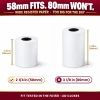
Thermal paper for the First Data FD150 is 2 1/4 in (58mm) wide on an 85 ft roll, and that is the only size these rolls come in. The FD150 sits beside the register and prints a slip for every card sale, so a dead roll means a customer standing at the counter while someone hunts for a spare.
No ink. No ribbon. No guessing which roll size to reorder. Just American-made thermal rolls that load into the FD150 and print from the first sale of the day to the last.
✅ Key Features
- ✅ 2 1/4 in (58mm) wide by 85 ft long, the roll size the FD150 printer is built around
- ✅ 1.77 in (45mm) across on a 1/2 in core, so the roll seats flat and the cover closes
- ✅ Heat does the printing, so there's no ink or ribbon, and receipts come out dark and sharp from the first slip to the last
- ✅ BPA-free coating on the receipts your staff hand across the counter all day
- ✅ A warning indicator shows up as the roll runs low, so your staff knows a fresh roll is due before receipts stop
- ✅ Made in the USA to one specification, so the next order prints like the last one
- ✅ Five pack sizes, from a 6-roll pack up to a 50-roll case
Specifications
| Compatible Models: | First Data FD150 |
| Paper Size: | 2 1/4 in (58mm) wide x 85 ft long |
| Paper Type: | Thermal |
| Roll Diameter: | 1.77 in (45mm) across |
| Core: | 1/2 in |
| End-of-Roll Indicator: | Yes |
| Thickness: | 2.1 mil |
| Paper Weight: | 48 gsm |
| BPA-Free: | Yes |
| Made In: | United States |
| Pack Sizes: | 6, 12, 18, 24 and 50 rolls |
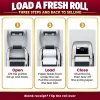
▶ Loading Paper in the FD150
• Pop the latch on the printer cover and lift the cover open.
• Take out the empty core from the last roll.
• Set the new roll in the bay so the thermal print side feeds out facing you, the operator.
• Press the cover down evenly on both sides until it shuts, with a short tail of paper out of the slot.
• Tear off the extra paper against the serrated bar.
▶ Which Rolls Fit the FD150
• ✅ 2 1/4 x 85 ft thermal: this roll.
• ❌ 3 1/8 in rolls: too wide for the FD150's 2 1/4 in printer.
• ❌ Plain bond paper: the FD150 prints with heat, and First Data calls for thermal paper.
• Running a different First Data model? The First Data paper size guide matches every model to its roll.
▶ Blank, Light or Skipped Receipts on the FD150
• Receipt comes out blank: the roll went in backward. Turn it around so the print side feeds out toward you.
• Print stays light or skips lines on a fresh roll: look at the rubber paper roller in the cover. A worn one is replaceable with the FD150 Paper Roller Assembly.
• Paper jams at the slot: First Data warns against loading any roll with folds, wrinkles, tears or holes along the edges. Unwind a turn or two past the damage and reload.
▶ Why BPA-Free Matters
The image on a thermal receipt comes from a coating that darkens with heat, and whoever works the FD150 touches that coating with every slip they tear off. These rolls carry a BPA-free coating, so the person at the register isn't handling BPA shift after shift.
▶ Why American-Made Paper
Paper is the cheapest thing on the counter and the one most likely to stop a sale. Every roll here is produced in the United States to a single specification, so the width, the coating and the length stay the same from one order to the next.
▶ Storing Spare Rolls
First Data's FD150 guide notes that impact, friction, temperature, humidity and oils all affect how thermal paper prints and how long receipts last. Leave spares sealed in the box, away from windows, heaters and anything that runs hot behind the counter.
▶ Signs You're Using Low-Quality Paper
• Faded or light printing: the thermal coating is too thin or unevenly applied.
• Receipts that fade within weeks: weak coating breaks down fast in light, heat or humidity.
• White dust in the paper bay: the paper is shedding lint that wears the print head and streaks the print.
• Frequent jams: uneven thickness or rough edges catch in the FD150's paper path.
• Rolls running out early: the rolls are shorter than advertised.
3 Reviews
-
Good Quality
We have a ton of credit card sales, but many companies are thinning out their paper, and it's getting thrown around in the credit card machine itself. We needed a quality paper that not only took on print well, but it had to be sturdy enough to provide a quality receipt without it being too thick and bulky, too. This is the right fit. Thank you!
-
Fast delivery
Affordable price and fast delivery. Highly recommend.
-
Credit card receipt paper
Great product. Great value.
 Attention CA Residents: Prop 65 Warning
Related Products
Related Products
First Data FD150 Power Supply Adapter
First Data

First Data FD150 Paper Roller Assembly
First Data

First Data FD150 Credit Card Terminal
First Data





