
TerminalDepot
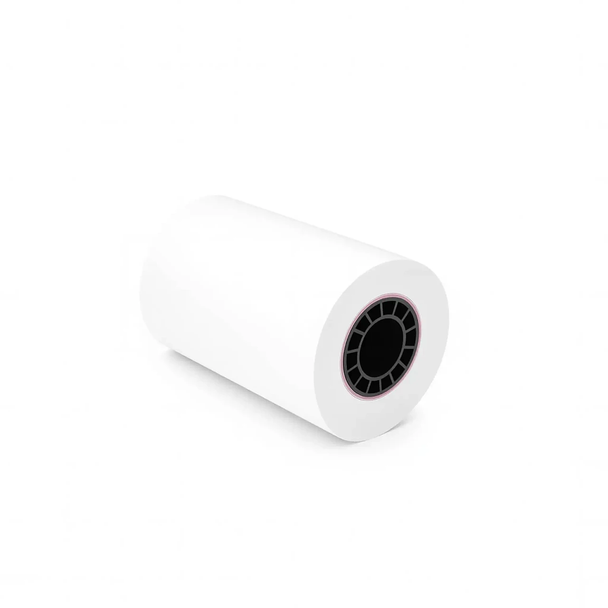
Ingenico Desk 5000 Thermal Paper 2 1/4 x 50 ft | BPA-Free American Made
- SKU:
- PPRIDSK5000
- UPC:
- 7061284282417
- MPN:
- PPRIDSK5000
- Condition:
- New
- Availability:
- In Stock




Description
American Made Thermal Paper Rolls for the Ingenico Desk 5000
The Desk 5000 is the workhorse of your checkout counter. Every card dip, contactless tap, and chip read ends with a printed receipt, and that receipt has to be legible, clean, and ready before the next customer steps up. These American-made BPA-free thermal rolls are sized to the exact 2 1/4 in (58mm) width your Desk 5000 needs. Drop one in, close the cover, and forget about paper until the red warning stripe tells you otherwise.
Thermal paper prints with heat, not ink. There is no cartridge to replace, no ribbon to thread, and no toner to shake. The roll is the only consumable your terminal uses.
Key Features
- ✅ Precision-cut 2 1/4 in width seats flush in the Desk 5000 compartment with no trimming or forcing
- ✅ BPA-free thermal coating keeps printed receipts safe to handle for staff and customers
- ✅ Heat-activated printing eliminates ink, toner, and ribbon costs entirely
- ✅ Red end-of-roll indicator gives advance warning so you can swap rolls between customers
- ✅ Consistent American-made paper stock reduces lint buildup and protects the thermal print head
Specifications
| Compatible Models: | Ingenico Desk 5000 |
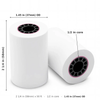
| Paper Size: | 2 1/4 in (58mm) x 50 ft |
| Core Size: | 1/2 inch plastic core |
| Roll Diameter: | 1.45 in (37mm) |
| Paper Weight: | 48 gsm |
| BPA-Free: | Yes |
| End-of-Roll Indicator: | Yes (red) |
| Made In: | United States |
| Pack Sizes: | 6, 12, 18, or 24 rolls, or 50-roll case |
▶ How to Load Paper in Your Desk 5000
- Lift the printer cover release on the top-rear of the Desk 5000. The cover swings open to expose the paper bay.
- If an empty core is sitting in the bay, pull it out and discard it.
- Place the new roll in the bay so the paper unwinds from underneath, feeding toward the front of the terminal.
- Pull enough paper forward to extend past the tear bar, then press the cover down until it latches.
Run a quick test transaction or press the paper-feed key to confirm the roll advances. If the receipt prints blank, the roll is upside down. Flip it and try again.
▶ Which Roll Sizes Fit the Desk 5000
The Desk 5000 paper bay is designed around a specific roll diameter. Rolls that exceed it physically will not allow the cover to close:
| 2 1/4 in x 50 ft (this product): | ✅ Correct size. 1.45 in diameter seats properly |
| 2 1/4 in x 85 ft: | ❌ Diameter too large for the Desk 5000 bay |
| 2 1/4 in x 230 ft: | ❌ Full-size register roll. Will not fit |
| 3 1/8 in x any length: | ❌ Width is for standalone receipt printers, not payment terminals |
If the cover does not close easily, the roll is the wrong size. Never force it shut.
▶ Troubleshooting Common Print Issues
- Blank receipts: The paper is loaded with the wrong side facing the print head. Thermal paper has a coated side (slightly glossy) and an uncoated side. The coated side must face the print head.
- Light or faded text: Check that you are using thermal paper, not bond. Bond paper will not react to the thermal print head at all. Also check that the print head surface is clean and free of dust or adhesive residue.
- Paper not advancing: Confirm the roll spins freely in the bay and is not binding against the sides. If the roll was stored in heat or direct sunlight, the outer layers may have stuck together.
▶ Compatible Terminals
- ✅ Ingenico Desk 5000
This roll is cut for the Desk 5000 specifically. If your counter runs a different Ingenico model, check our store for that terminal\'s dedicated paper page to confirm the right width and diameter.
▶ Why Source Matters for Receipt Paper
Receipt paper is a commodity until it jams your terminal during a line of waiting customers. The difference between paper that feeds cleanly and paper that does not comes down to manufacturing consistency: uniform width tolerance, even coating, and a core that seats without wobble. Every roll we stock is produced in the United States under the same manufacturing standards, batch after batch. That consistency is what keeps your Desk 5000 printing without surprises.
▶ Storing Thermal Paper
Keep rolls sealed in their original packaging until you need them. Thermal paper darkens when exposed to heat, so avoid storing it near ovens, coffee stations, sunny windows, or heating vents. A shelf in a climate-controlled stockroom is ideal. Properly stored rolls hold full print quality for five years or longer.
3 Reviews
-
Exactly what I needed
Exactly what I needed, fit perfectly, and I received it the next day, awesome service.
-
Quality Paper with Quick Shipping
Our order shipped out the same day and we received it a few days later. Paper fit in our terminal with no issues, and quality seemed better than the last place we ordered it from..
-
Perfect Fit!!!
Paper rolls fit our machine with no issue, and shipping was quick to. Will buy more.
 Attention CA Residents: Prop 65 Warning
Related Products
Related Products

Ingenico Desk/5000 Power Supply
Ingenico

Ingenico Desk 3500 / Desk 5000 Magic Box Cable | OEM Coiled 3ft
Ingenico

Ingenico Desk 3500 Thermal Paper Rolls 2 1/4" x 50' | BPA-Free American Made
TerminalDepot
Ingenico Move 5000 Thermal Paper Rolls 2 1/4" x 50' | BPA-Free American Made
TerminalDepot

Ingenico Desk 5000 Coreless Paper (50 Rolls)
TerminalDepot





