
Ingenico
Ingenico Desk 3500 / Desk 5000 Magic Box Cable | OEM Coiled 3ft

- SKU:
- 296165425
- MPN:
- 296165425
- Condition:
- New






Description
Ingenico Desk 3500 / Desk 5000 Magic Box Cable | OEM Coiled Connector
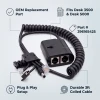
Your Desk 3500 or Desk 5000 depends on one cable to carry network, phone line, and power. The Magic Box cable is the coiled connector assembly that brings everything together through a single inline breakout box. Part number 296165425AB. If your current cable is damaged, frayed, or dropping connections mid-transaction, this genuine Ingenico OEM replacement restores reliable operation.
The Magic Box is the small connector box built onto this coiled cable. It holds the Ethernet and dial ports on one side. At the terminal end, an RS232 port and barrel power jack connect alongside the proprietary plug that seats into the bottom of the terminal. Box and cable are a single assembly.
Key Features
- ✅ Genuine OEM Ingenico (296165425AB) - guaranteed fit, no compatibility guesswork
- ✅ Magic Box connector box and coiled cable in one assembly - single part replaces the entire connection
- ✅ Ethernet and dial/phone jacks - keeps your terminal online and processing without interruption
- ✅ RS232 port and barrel power jack at the terminal end - connects power and peripherals in one plug
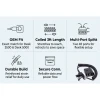
- ✅ Coiled design extends up to 3 feet and retracts - keeps counters clean without cable clutter
- ✅ Factory-spec shielding and gold-plated contacts - stable signal transfer that prevents payment errors
- ✅ Drop-in replacement - swap the old cable and process transactions in minutes
Specifications
| Compatible Terminals: | Ingenico Desk 3500, Ingenico Desk 5000 |
| OEM Part Number: | 296165425AB |
| Manufacturer: | Ingenico (OEM Original) |
| Product Type: | Magic Box connector cable (box and coiled cable, one assembly) |
| Extended Length: | 3 feet (coiled, extends and retracts) |
| Ports on the Magic Box: | Ethernet (ETH) and dial/phone line |
| Terminal-End Connections: | RS232 port, barrel power jack, terminal connector |
| Power Input: | Barrel jack for the separate Ingenico power supply |
| Terminal Connector: | Ingenico Desk 3500/5000 proprietary |
| Condition: | New (OEM Original) |
▶ What Is the Ingenico Magic Box
On the Desk 3500 and Desk 5000, the Magic Box is the small black connector box that is part of this coiled cable. It is not a separate base station and the terminal does not sit on it. It is a breakout box that puts all of the terminal's external connections in one place.
The box itself holds the Ethernet (ETH) jack and the dial/phone line jack. At the terminal end of the coiled lead there is an RS232 port and a barrel jack for the power supply, plus the connector that plugs into the bottom of the terminal.
You route your network cable, phone line, and power into the Magic Box and its ports, and the single coiled lead carries everything to the terminal. If this cable fails, the terminal loses network, dial, and power.
▶ When to Replace Your Magic Box Cable
• Terminal intermittently loses power or reboots while connected
• Terminal shows network errors or "Initializing Host IP" messages despite a working Ethernet drop into the Magic Box ETH jack
• Visible damage: frayed coil, cracked insulation, bent or corroded connector pins
• The terminal connector or the barrel power jack no longer clicks in or holds securely
• Coiled lead is stretched out and no longer retracts (stress damage from pulling too far)
A partially damaged cable can cause intermittent issues that are hard to diagnose. Replacing the Magic Box cable is the fastest and cheapest step before suspecting the terminal itself.
▶ Installation
1. Disconnect the old Magic Box cable from the terminal by pressing the release tabs and pulling straight out.
2. Plug the new coiled lead into the connector on the bottom of the Desk 3500 or Desk 5000 until it clicks.
3. Connect your Ethernet cable into the ETH jack on the Magic Box, and your phone line into the dial jack if you process by dial.
4. Plug the Ingenico power supply into the barrel jack and into mains power.
5. The terminal powers on and establishes network connectivity automatically.
6. Run a test transaction to confirm data and payment processing are working.
Keep the Magic Box accessible after installation for maintenance and helpdesk diagnosis. Avoid routing the coil so that it is under tension when the terminal is at rest.
▶ Magic Box Cable vs Direct USB Cable
The Desk 3500 and Desk 5000 can connect to a POS setup in two ways:
Magic Box setup (this cable): The terminal uses the Magic Box cable so that Ethernet, dial, RS232, and power all come together through one coiled lead. This is the standard deployment for most retail and restaurant environments.
Direct USB setup (separate cable): The terminal connects directly to a PC or POS system through a right-angle USB cable (part 296171895AB, sold separately), with power from a separate adapter. No Magic Box is used. This setup is for integrating directly with POS software over USB.
If your terminal currently uses a Magic Box, you need THIS cable. If it connects straight to a computer over USB, you need the right-angle USB cable instead.
▶ Why Buy OEM
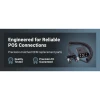
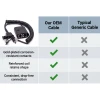
The Magic Box cable carries power, data, and network to your terminal through a single assembly. OEM Ingenico cables are built with factory-spec shielding, gold-plated contact pins, and a coil that retains its shape through years of daily use. That means consistent connections, clean signal transfer, and no mid-transaction dropouts.
A genuine OEM cable costs far less than a single service call for connectivity issues.
▶ What Is Included
• 1x OEM Ingenico Magic Box cable (296165425AB), the connector box and coiled lead as one assembly
• Coiled design, extends up to 3 feet
• New, unused condition
NOT included:
• Power supply (the Ingenico power supply is sold separately)
• Ethernet cable
• Terminal
▶ Compatible Terminals
✅ Ingenico Desk 3500 - Compatible
✅ Ingenico Desk 5000 - Compatible
This is the Magic Box cable for the Desk 3500/5000. It does not connect a terminal directly to a PC or POS system.
NOT compatible:
❌ Ingenico iCT220 or iCT250 Magic Box (different cable, part 296105416)
❌ Ingenico Lane 3000/5000/7000/8000 (different terminal family)
❌ Ingenico Lane 3600 (different terminal family)
▶ Troubleshooting
Terminal does not power on: Confirm the power supply is plugged into the barrel jack and into mains power. Reseat the coiled lead at the terminal. If power is present at the supply but the terminal stays dark, the cable may be faulty.
"Initializing Host IP" or network errors: Reseat the coiled lead at the terminal and confirm your Ethernet drop is in the ETH jack on the Magic Box. If the error persists with a new cable, your Ethernet drop or upstream network may be the issue.
Intermittent disconnections: Check for a stretched or damaged coil and confirm the terminal connector and barrel jack are seated and not corroded. If the coil has been pulled past its natural extension repeatedly, the internal wires may be stressed. Replace the cable.
Dial processing fails: Confirm the phone line is in the dial jack on the Magic Box, not the ETH jack. Test the line on a known-good cable to rule out the wall jack.
▶ Other Supplies for the Ingenico Desk 3500/5000
Right-angle USB cable for direct PC connection (296171895AB). RS232 to mini USB cable. iPP3XX right-angle USB cable for pin pad connection. Thermal paper rolls. Power supplies. Check our Ingenico Desk accessories collection for compatible parts.
 Attention CA Residents: Prop 65 Warning
Related Products
Related Products

Ingenico Desk 3500 / Desk 5000 Paper Roller Assembly
Ingenico

Ingenico Desk 3500 / Desk 5000 Tailwind Backplate
Tailwind

Ingenico Desk 3500 Coreless Thermal Paper Rolls
TerminalDepot
Ingenico Desk 3500 Thermal Paper Rolls 2 1/4 x 50 ft | BPA-Free American Made
TerminalDepot

Ingenico Desk/3500 Power Supply
Ingenico

Ingenico Desk/5000 Power Supply
Ingenico





