
Ingenico
Ingenico Lane 7000 / Lane 8000 Stylus Pen | OEM 296241618

- SKU:
- 296241618
- MPN:
- 296241618
- Condition:
- New




Description
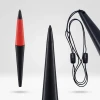
Ingenico Lane 7000 / Lane 8000 Stylus Pen - OEM Replacement
The stylus pen on your Lane 7000 or Lane 8000 takes more abuse than any other part of the terminal. Customers press down when signing, drag the tip across the screen dozens of times a shift, and the tether cord gets pulled and stretched every transaction. When the tip wears flat or the cord frays, signatures stop registering and your checkout line stalls. This OEM Ingenico replacement stylus (296241618) plugs into the same port, restores accurate touch response, and gets your lane moving again.
Tethered design with a straight cord and direct plug-in connector. Unplug the old stylus, plug in the new one. No tools, no configuration, no reboot required.
Key Features
- ✅ Genuine OEM Ingenico stylus (296241618) - exact fit for Lane 7000 and Lane 8000
- ✅ Precision touch tip - accurate signature capture and smooth screen navigation
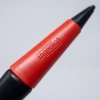
- ✅ Red ergonomic grip - comfortable hold with textured surface for secure handling
- ✅ Reinforced tether cord - keeps the pen attached to the terminal and resists daily wear
- ✅ Durable ABS plastic body - withstands heavy daily use without cracking
- ✅ Drop-in replacement - swap in seconds with no tools or terminal restart
Specifications
| Compatible Terminals: | Ingenico Lane 7000, Ingenico Lane 8000 |
| OEM Part Number: | 296241618 |
| Manufacturer: | Ingenico (OEM Original) |
| Product Type: | Tethered stylus pen with cord |
| Grip: | Red ergonomic rubber grip |
| Body Material: | ABS plastic |
| Tether: | Reinforced cord with connector |
| Condition: | New (OEM Original) |
▶ When to Replace Your Stylus Pen
• Tip is worn flat and signatures are not registering on the screen
• Customers struggle to tap buttons or navigate menus accurately
• Tether cord is frayed, stretched, or pulling apart at the connection point
• Stylus connector is loose and disconnects from the terminal intermittently
• The red grip is cracked or the pen body feels rough against the screen
A worn stylus slows down every transaction. Replacing it takes seconds and eliminates a friction point your customers notice every time they sign.
▶ How to Replace the Stylus
1. Disconnect the old stylus tether cord from the terminal.
2. Remove the old stylus pen from the terminal.
3. Connect the new stylus tether cord to the terminal.
4. Test by signing on the screen to confirm the stylus responds accurately.
No tools required. No terminal configuration changes. The replacement takes under a minute.
▶ Why Buy OEM
The stylus tip and tether cord are the most-replaced parts on Lane 7000 and Lane 8000 terminals. OEM Ingenico stylus pens are built with a precision-molded tip that glides across the touchscreen without scratching, a durable ABS body that holds up to daily drops and handling, and a reinforced tether cord that resists fraying at the connection point. Third-party stylus pens often use harder tips that scratch the screen surface over time or thinner cords that break within weeks.
▶ What Is Included
• 1x OEM Ingenico stylus pen (296241618)
• Red ergonomic rubber grip
• Reinforced tether cord with connector
• New, unused condition
NOT included:
• Terminal
• Screen protector
▶ Compatible Terminals
✅ Ingenico Lane 7000 - Compatible
✅ Ingenico Lane 8000 - Compatible
NOT compatible:
❌ Ingenico Lane 3000 (no touchscreen, no stylus port)
❌ Ingenico Lane 5000 (different stylus and mount system - see part 296219158)
❌ Ingenico iSC250 / iSC350 / iSC480 (different connector - see part 296189194)
▶ Troubleshooting
Stylus does not respond on screen: Confirm the tether cord connector is fully seated in the terminal port. Power cycle the terminal by unplugging and reconnecting the power supply. If the screen still does not respond, the touchscreen digitizer may need calibration or service.
Signatures look jagged or skip: Clean the screen with a soft, dry cloth. Grease and dirt cause the tip to skip. If cleaning does not help, the stylus tip is worn and needs replacement.
Tether cord keeps pulling out: Check that the connector is fully inserted into the terminal port. If the connector no longer holds firmly, the port or connector may be worn and the stylus needs to be replaced.
 Attention CA Residents: Prop 65 Warning
Related Products
Related Products

Ingenico Lane 5000 / 7000 / 8000 Vbox Kit
Ingenico

Ingenico Lane 3000 / 7000 / 8000 FirstBase Mount
Tailwind

Ingenico iSC480 / Lane 7000 / 8000 Power Supply
Ingenico

Ingenico Lane 3000 / 7000 / 8000 Tailwind Backplate
Tailwind

Ingenico Lane 3000 / 5000 / 7000 / 8000 to USB Cable
Ingenico





