
Ingenico
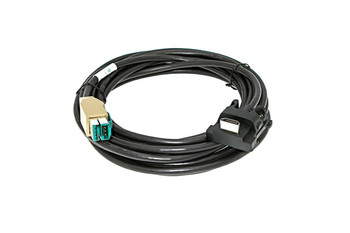
Ingenico Lane 3600 Dual USB Cable 5m (16.4ft) | Data + Power Split | 296116381AE

- SKU:
- 296116381AE-L3600
- MPN:
- 296116381AE
- Condition:
- New

Description
Ingenico Lane 3600 Dual USB Cable 5m | Split Data and Power Connection
OEM Ingenico dual USB cable for the Lane 3600 terminal. This 5-meter (16.4 foot) cable splits into two USB-A plugs: one carries data to your POS system, the other delivers power from a USB port or USB power adapter. No separate Ingenico power supply needed. Part number 296116381AE.
The extra length makes this cable ideal for installations where the POS system is mounted under a counter, in a back office, or otherwise far from the terminal location. The dual USB design lets you draw power from any available USB port or a standard USB wall adapter without needing a dedicated power supply.
Key Features
- ✅ OEM Ingenico - part number 296116381AE
- ✅ Connects Lane 3600 to POS system
- ✅ 5 meters (16.4 feet) - extra reach for flexible placement
- ✅ Splits into two USB-A plugs: one data, one power
- ✅ No external Ingenico power supply needed
- ✅ Compatible with Ingenico Lane 3600 terminal
- ✅ Drop-in replacement for damaged or missing cables
| OEM Part Number: | 296116381AE |
| Manufacturer: | Ingenico (OEM Original) |
| Cable Type: | Dual Gang USB (split data + power) |
| Length: | 5 meters (16.4 feet) |
| Terminal Connector: | Ingenico Lane 3600 proprietary |
| Host Connectors: | 2x USB-A plugs (1 data, 1 power) |
| External Power Supply Required: | No (power delivered via second USB plug) |
| Condition: | New (OEM Original) |
▶ About the Ingenico Lane 3600
The Ingenico Lane 3600 is a next-generation countertop payment terminal used in retail, restaurant, and hospitality environments. It supports EMV chip, contactless NFC, and magstripe payments with an Android-based operating system and touchscreen display.
The Lane 3600 requires both a data connection and a power source. Different cable options exist depending on your installation distance and how your POS system delivers power. This dual USB cable solves both problems in one run by splitting data and power across two standard USB connections over a 5-meter length.
▶ What Does "Dual Gang" Mean
Dual gang means the cable has two USB-A plugs on the host end instead of one. One plug carries data (connects to a USB port on your POS system or computer). The other plug carries power (connects to any USB port or USB wall charger that outputs enough amperage).
This design eliminates the need for a separate Ingenico power supply. Instead of running a USB cable plus a power adapter to the terminal, you run one cable with two plugs. Cleaner installation with less cable clutter.
The dual gang approach works with standard 5V USB ports. Unlike the 12V USB cable (296178419AB) which requires a special 12V USB port on your POS system, this cable works with any standard USB infrastructure.
▶ When to Use This Cable vs Other Lane 3600 Cables
This cable (296116381AE) - Dual Gang USB, 5m: Use when you need extra length (up to 16.4 feet between POS system and terminal) and want to power the terminal through standard USB ports without a separate Ingenico power supply. Two USB plugs required on the host side.
Lane 3600 12V USB Cable (296178419AB) - 2m, no PSU needed: Use when your POS system has a dedicated 12V USB output port. Single cable, single plug. Shorter (2 meters) but cleaner single-port installation.
If you need length over 6 feet AND want to avoid a separate power supply, this dual gang cable is your best option for the Lane 3600.
▶ Installation
1. Power off the Lane 3600 terminal.
2. Locate the cable port on the bottom of the Lane 3600.
3. Connect the terminal end of the cable (Ingenico proprietary connector) into the terminal port until it clicks.
4. Route the cable to your POS system or host computer location (up to 5 meters).
5. Connect the DATA USB-A plug into a USB port on your POS system or computer.
6. Connect the POWER USB-A plug into a second USB port on your POS system, a USB hub, or a USB wall charger (minimum 2A output recommended).
7. The terminal should power on once both plugs are connected. Wait for the home screen to appear.
8. Run a test transaction through your POS software to confirm data connection.
If the terminal does not power on, verify the power USB plug is connected to a port that provides sufficient amperage. Low-power USB ports (like those on keyboards or monitors) may not deliver enough current.
▶ What Is Included
✅ 1x OEM Ingenico Dual Gang USB cable (296116381AE)
✅ 5 meters (16.4 feet) length
✅ Two USB-A plugs on host end (data + power)
✅ New, unused condition
❌ Terminal NOT included
❌ Separate power supply NOT included (not needed with this cable)
❌ USB wall charger NOT included (any standard USB charger works for the power plug)
▶ Compatibility
✅ Ingenico Lane 3600
✅ Also works with: Ingenico Lane 3000, 5000, 7000, 8000
⚠️ Both USB-A plugs must be connected for the terminal to receive power. One plug alone will not power the terminal.
⚠️ The power USB plug requires a USB port with at least 2A output for reliable operation.
✅ Also compatible with Ingenico iPP310, iPP320, iPP350. Same connector.
✅ Also compatible with Ingenico iSC250, iSC350, iSC480. Same connector.
▶ Troubleshooting
Terminal does not power on: Both USB plugs must be connected. Verify the POWER USB plug is in a port with sufficient amperage (2A minimum). Try a different USB port or a dedicated USB wall charger. Low-power ports on keyboards, monitors, or passive USB hubs may not deliver enough current.
Terminal powers on but no data connection: Verify the DATA USB plug is connected to your POS system (not just a charger). Check POS software configuration. Restart both POS and terminal.
Intermittent power loss or reboots: The power source is likely underpowered. Switch the power USB plug to a higher-amperage USB port or a 2A+ USB wall charger.
Cable does not fit terminal: Confirm you have a compatible Ingenico terminal (Lane 3000, 3600, 5000, 7000, 8000, iPP320, iPP350, iSC250, iSC350, iSC480). All these models use the same connector.
▶ Other Supplies for the Ingenico Lane 3600
12V USB cable (2m, single port). Ethernet cables. Thermal paper rolls. Privacy shields. Mounting brackets. Check our Ingenico Lane accessories collection for compatible parts.
 Attention CA Residents: Prop 65 Warning
Related Products
Related Products

Ingenico Lane 3000/5000/7000/8000 Dual USB Cable 5m (16.4ft) | Data + Power Split | 296116381AE
Ingenico
Ingenico iPP320 / iPP350 / iSC250 / iSC480 Dual USB Cable 5m (16.4ft) | Data + Power Split | 296116381AC
Ingenico

Ingenico Lane 3600 to USB Cable
Ingenico

Ingenico Lane 3600 to External Powered USB Cable (13')
Ingenico