
Ingenico
Ingenico Lane 5000 Stylus Pen and Holder Kit | OEM 296219158

- SKU:
- 296219158
- MPN:
- 296219158
- Condition:
- New



Description
Ingenico Lane 5000 Stylus Pen and Holder Kit - OEM Replacement
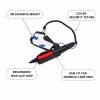
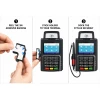
Every Lane 5000 needs a stylus within arm's reach. Without one, customers sign with their fingers, smudging the capacitive screen and slowing down every transaction. When the original stylus wears out, gets lost, or the holder breaks off, the whole checkout flow suffers. This OEM Ingenico kit (296219158) gives you a new capacitive stylus pen with a red ergonomic grip, a magnetic holder with 3M adhesive backing, and a coiled tether that keeps the pen attached to the terminal between signatures.
Peel the 3M backing, stick the holder to your Lane 5000, dock the stylus. No tools, no wiring, no terminal configuration.
Key Features
- ✅ Genuine OEM Ingenico kit (296219158) - exact fit for Lane 5000 only
- ✅ Capacitive stylus tip - designed for the Lane 5000 capacitive touchscreen, not resistive
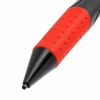
- ✅ Red dimpled rubber grip - non-slip hold for fast, accurate signatures
- ✅ Magnetic holder with 3M adhesive mount - peels, sticks, and holds the stylus securely between uses
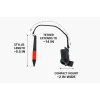
- ✅ Coiled security tether - extends to approximately 14 inches and retracts to prevent loss
- ✅ Durable ABS body - withstands daily use in high-volume retail environments
Specifications
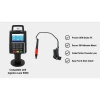
| Compatible Terminals: | Ingenico Lane 5000 |
| OEM Part Number: | 296219158 / 296219158AB |
| Manufacturer: | Ingenico (OEM Original) |
| Stylus Type: | Capacitive touchscreen stylus |
| Stylus Length: | Approximately 5.5 inches |
| Grip: | Red dimpled rubber (non-slip) |
| Holder Type: | Magnetic mount with 3M adhesive backing |
| Mount Width: | Approximately 2 inches |
| Tether: | Coiled security cord, extends to approximately 14 inches |
| Condition: | New (OEM Original) |
▶ When to Replace Your Stylus Kit
• Stylus tip is worn flat and signatures require excessive pressure to register
• Customers are using their fingers because the stylus is missing or broken
• Coiled tether has lost tension and no longer retracts
• Magnetic holder has broken off the terminal or the 3M adhesive has failed
• Setting up a new or refurbished Lane 5000 that did not include a stylus
• Your business requires stylus-captured signatures for compliance or dispute resolution
A missing stylus means finger smudges, slower transactions, and harder-to-read signatures. Replacing the kit takes under a minute.
▶ How to Install
1. Clean the area on the terminal where you will attach the magnetic holder.
2. Peel the 3M adhesive backing from the holder.
3. Press the holder firmly against the terminal body and hold for 10 seconds.
4. Dock the stylus in the holder and confirm the magnet holds it securely.
5. Test the stylus on the touchscreen to confirm it registers accurately.
No tools, no wiring, no terminal restart required.
▶ Why Use a Stylus Instead of Finger Signatures
• Screen protection: Reduces scratches and fingerprint buildup on the capacitive touchscreen
• Cleaner signatures: More legible for compliance and chargeback dispute resolution
• Hygiene: Reduces direct contact with a shared touchscreen surface
• Speed: Customers sign faster and more accurately with a stylus than with a finger
▶ What Is Included
• 1x OEM Ingenico capacitive stylus pen with red grip
• 1x Magnetic holder with 3M adhesive mount
• Coiled security tether (attached)
• New, unused condition
NOT included:
• Terminal
• Screen protector
▶ Compatible Terminals
✅ Ingenico Lane 5000 - Compatible
NOT compatible:
❌ Ingenico Lane 3000 (no touchscreen, no stylus port)
❌ Ingenico Lane 3600 (no touchscreen)
❌ Ingenico Lane 7000 (different stylus and connector - see part 296241618)
❌ Ingenico Lane 8000 (different stylus and connector - see part 296241618)
▶ Why Buy OEM
The Lane 5000 uses a capacitive touchscreen. Generic resistive styluses will not register properly on it. The OEM Ingenico stylus has a capacitive tip calibrated for the Lane 5000 screen, a coiled tether built to retract reliably after thousands of uses, and a magnetic holder sized to fit the terminal body. Third-party kits often use the wrong stylus type, adhesive that fails within weeks, or tethers that stretch and stop retracting.
▶ Troubleshooting
Stylus does not respond on screen: Confirm you are using this capacitive stylus, not a resistive type. Clean the screen with a soft, dry cloth. If the screen still does not respond, the touchscreen digitizer may need service.
Holder keeps falling off: The mounting surface must be clean and dry before applying the 3M adhesive. Remove any residue from the old mount first. Press firmly for at least 10 seconds. If the adhesive has already been applied and removed, it will not re-stick and the kit needs to be replaced.
Tether does not retract: The coiled tether loses tension over time with heavy use. A tether that hangs limp or stays extended is a sign the kit needs replacement.
 Attention CA Residents: Prop 65 Warning
Related Products
Related Products

Ingenico Lane 7000 / Lane 8000 Stylus Pen | OEM 296241618
Ingenico

Ingenico Lane 5000 / 7000 / 8000 Vbox Kit
Ingenico
Ingenico Lane 5000 / 7000 FirstBase Mount
Tailwind

Ingenico Lane 5000 / 7000 Tailwind Backplate
Tailwind

Ingenico ISC250 / ISC350 / ISC480 Stylus Pen
Ingenico





