
VeriFone
VeriFone MX915 / MX925 Ethernet (RJ45) to USB Cable | OEM | 1m, 3m, 5m

- SKU:
- VFN-CBL132-002-01-A
- MPN:
- CBL132-002-01-A
- Condition:
- New

Description
VeriFone MX915 / MX925 Ethernet (RJ45) to USB Cable - Genuine VeriFone OEM in Three Lengths
Every card payment your MX915 or MX925 takes travels through one cable: the link between the terminal and your register. When that cable gets crushed under a drawer, chewed at the connector, or walks off during a counter remodel, the lane stops taking payments. This is the genuine VeriFone replacement - OEM part CBL132-002-01-A, CBL132-002-03-A, or CBL132-002-05-A depending on length - RJ45 end into the terminal, USB end into your POS system, back in business.
No adapters. No splicing. No guessing whether a generic cable will work. Just the exact VeriFone part your terminal was built to use, in the length your counter actually needs.
Key Features
- ✅ Genuine VeriFone OEM cable - the exact part POS installers specify, not an aftermarket copy
- ✅ Connects your MX915 / MX925 to any POS register or PC with a standard USB port
- ✅ Three lengths - 1m (3.3 ft), 3m (9.8 ft), 5m (16.4 ft) - so the cable reaches without slack dangling across the lane
- ✅ Molded connectors seat firmly so the connection doesn't work loose mid-shift
- ✅ Drop-in replacement for a damaged or missing cable - plug in and take payments again
Specifications
| Compatible Terminals: | VeriFone MX915, MX925 |
| OEM Part Numbers: | CBL132-002-01-A (1m), CBL132-002-03-A (3m), CBL132-002-05-A (5m) |
| Cable Type: | Non-powered USB data cable |
| Terminal End: | RJ45 - plugs into the terminal's Ethernet port |
| POS/PC End: | USB-A - plugs into your register or computer |
| Lengths Available: | 1m (3.3 ft), 3m (9.8 ft), 5m (16.4 ft) |
| Powered: | No - data connection only |
| Condition: | New - OEM Original |
| Brand: | VeriFone |
▶ What This Cable Does
The RJ45 end plugs into the Ethernet port on your MX915 or MX925. The USB-A end plugs into your POS register or PC. Your payment software then communicates with the terminal over that USB connection.
This is a non-powered data cable: it carries the connection between terminal and register, while the terminal continues to run off its own power supply.
▶ Which MX915 / MX925 Cable Do I Need?
VeriFone made several cables for these terminals, and they are not interchangeable:
• This cable - CBL132-002-01-A, CBL132-002-03-A, CBL132-002-05-A: Non-powered RJ45 to USB data cable. The standard replacement for connecting the terminal to a POS system or PC over USB.
• CBL132-006-03-A: The powered version, with an external power port on the USB end. We list it separately as the MX915 / MX925 Ethernet to External USB Powered Cable.
• CBL132-003-01-A: The RJ45 to USB Host cable - a different connection mode. If your installer specified this part, it is listed separately on our site.
• 23741-02-R (Blue): The legacy multi-port block cable. VeriFone superseded its USB data role with this cable - CBL132-002-03-A is the like-for-like 3m replacement.
• 23998-02-R (Yellow): The dual gang 12V powered USB cable, for powered USB register ports.
If your installer or processor gave you a part number, match it exactly. If they didn't, and you simply need the terminal talking to your register over USB, this is the cable.
▶ Which Length Should I Choose?
• 1m (3.3 ft) - CBL132-002-01-A: Terminal sits on the same counter, right next to the register.
• 3m (9.8 ft) - CBL132-002-03-A: Terminal is separated from the register and the cable runs under or behind the counter.
• 5m (16.4 ft) - CBL132-002-05-A: Long runs - the register sits away from the lane or the cable routes through cabinets.
▶ Does This Cable Power the Terminal?
No. The MX915 and MX925 run off their own power supply, and this cable carries data only. If your terminal won't turn on, the fix is the power supply, not this cable - we carry the matching VeriFone MX915 / MX925 power supply (PWR132-003-01-B) separately.
▶ Troubleshooting: Register Not Seeing the Terminal
• Reseat both ends of the cable - the RJ45 should click into the terminal and the USB should sit fully in the port.
• Try a different USB port on the register or PC.
• Confirm the terminal itself has power and is booted before blaming the cable.
• Check the RJ45 tab and cable jacket for damage - a crushed connector or kinked run can kill the connection.
• Make sure you are using the cable type your POS setup calls for - a system wired for the powered CBL132-006-03-A or host CBL132-003-01-A cable will not behave with a different cable.
▶ What's Included
• 1x VeriFone MX915 / MX925 Ethernet to USB cable (OEM) in your selected length.
Not included: power supply, terminal, or mounting hardware.
▶ Compatible Terminals
• VeriFone MX915
• VeriFone MX925
Verified for the MX 915 and MX 925. If you run a different VeriFone model, match your part number before ordering.
 Attention CA Residents: Prop 65 Warning
Related Products
Related Products

VeriFone MX915 / MX925 RJ45 to USB Host Cable
VeriFone
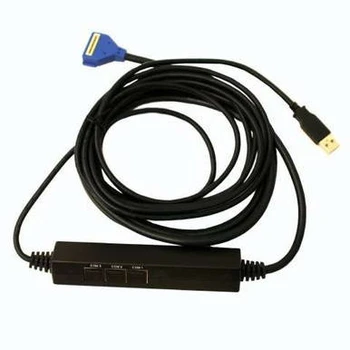
VeriFone MX915 / MX925 Ethernet to PC USB Cable (Blue)
VeriFone

VeriFone MX915 / MX925 Ethernet to External USB Powered Cable
VeriFone

VeriFone MX915 / MX925 to Dual Gang USB Cable (Yellow)
VeriFone

VeriFone MX915 / MX925 Power Supply
VeriFone





