
VeriFone
VeriFone P400 / P200 USB, Ethernet and RS232 Dongle Cable 1m | OEM CBL435-044-01-C
- SKU:
- CBL435-044-01-C
- MPN:
- CBL435-044-01-C
- Condition:
- New



Description
VeriFone P400 / P200 Dongle Cable with USB-A, Ethernet and RS232, OEM Part CBL435-044-01-C
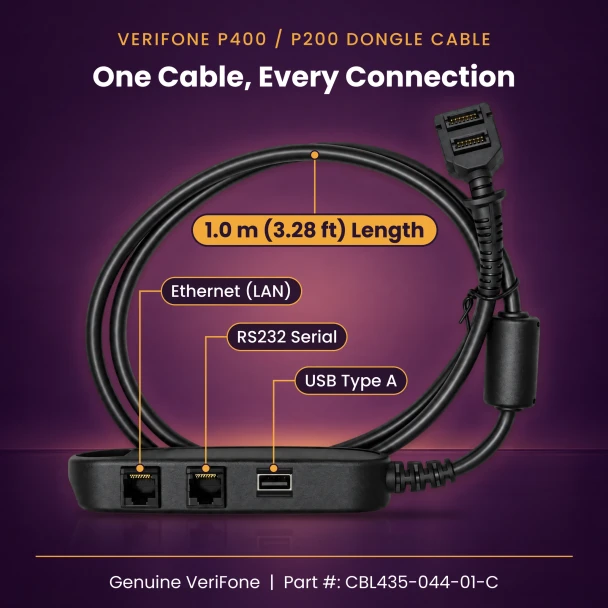
This is the VeriFone dongle cable for the P400 and P200 that adds a full-size type A USB port to the junction box. One 1 meter lead runs from the pad's 28-pin port to a small box with an RJ-45 LAN jack, a MOD-8 jack for RS232 serial, a type A USB port, a mini USB port and a DC jack for power. It is the most complete breakout VeriFone lists for these pads.
VeriFone ships the P400 and P200 as the PIN pad only, with no cable in the box, so every new lane needs one. If your lane runs on the network today and might move to serial or USB later, this single part number covers all three without a cable swap.
Key Features
- ✅ Genuine VeriFone part, CBL435-044-01-C, named in VeriFone's P400 and P200 installation guides
- ✅ Made for four PIN pads: P400, P400 Plus, P200 and P200 Plus
- ✅ Five connections in one box: RJ-45 LAN, MOD-8 RS232, type A USB, mini USB and DC power
- ✅ The only P400 / P200 dongle in VeriFone's list with a type A USB port
- ✅ DC jack takes the VeriFone power pack, which a P400 needs for Ethernet and full screen and keypad brightness
- ✅ 28-pin plug sits under the pad's compartment cover, held by the captive screw
Specifications
| OEM Part Number: | CBL435-044-01-C |
| Compatible PIN Pads: | VeriFone P400, P400 Plus, P200, P200 Plus |
| Cable Type: | Multi-port dongle with junction box (USB, Ethernet, RS232) |
| Length: | 1.0 m (3.28 ft), PIN pad to junction box |
| PIN Pad Connector: | 28-pin, held by the compartment cover and captive screw |
| Junction Box Ports: | RJ-45 LAN, MOD-8 (RS232), type A USB, mini USB, DC-in jack |
| Power Pack: | VeriFone PWR435-001-01-A, sold separately |
| Condition: | New |
| Brand: | VeriFone |
▶ Who Needs This Cable
• You just received a P400 or P200 and found only the pad in the box. VeriFone sells the cable as a separate part.
• Your POS or processor wants the pad on the LAN with its own network connection, and you also want serial and USB available at the same lane.
• You keep spares for several lanes that are wired differently and would rather stock one cable part number than three.
• Your current dongle has a cracked box, a loose DC jack or a damaged 28-pin plug.
▶ The Ports, One by One
• RJ-45 LAN: connects the pad to your network switch or router with a standard network cable.
• MOD-8: the RS232 serial connection for registers and hosts that still talk to the pad over a COM port. It is the same size as the LAN jack, so check the molded label before plugging in.
• Type A USB: the full-size USB port that sets this cable apart from the other P400 / P200 dongles.
• Mini USB: a second USB connection on the opposite side of the box.
• DC-in: the power input for the VeriFone power pack.
▶ Power: When You Need the Power Pack
A P400 can run on 5V from USB, but VeriFone lists what it gives up in that mode: Ethernet does not work, Bluetooth and Wi-Fi are off, the screen backlight drops to 30 percent, the keypad backlight is off and audio volume is reduced. For full operation the P400 takes 7 to 12V DC at 1A through the DC jack on this cable.
VeriFone specifies its PWR435-001-01-A power pack for these pads and states that the P200 Plus needs external power to run every feature. Connect and route all cables before you plug the power pack into the wall. VeriFone warns that the wrong power sequence can degrade the pad's host port.
• VeriFone P200 / P400 Power Supply (PWR435-001-01-A)
▶ How to Install
1. Leave the power pack unplugged from the wall.
2. Lay the pad face down on a soft, clean surface.
3. Loosen the captive screw, then slide out and lift the cable compartment cover.
4. Push the 28-pin plug all the way into its socket, refit the cover and snug the screw down so the cover clamps the lead.
5. Connect your network, serial or USB lead to the matching port on the box, plus the power pack's plug to the DC jack.
6. Plug the power pack into the wall last.
▶ Troubleshooting
• No network on a P400: check that the power pack is connected. On USB power alone, the P400 turns Ethernet off.
• Network cable plugged in but no link: confirm it is in the LAN jack and not the MOD-8 serial jack next to it.
• Dim screen or no keypad light: the pad is running in reduced-power USB mode. Connect the power pack.
• Pad drops out when the cable is bumped: reopen the compartment, reseat the 28-pin plug and tighten the captive screw.
▶ What's Included
• The CBL435-044-01-C cable itself: 1.0 m lead, 28-pin plug on one end and the five-port junction box on the other. New.
Not included: the PIN pad, network or serial leads, USB cables and the power pack. Fast shipping.
▶ Other VeriFone P400 / P200 Cables
• VeriFone P400 / P200 / VX820 / VX805 USB Cable 3m (CBL282-038-02-B)
• VeriFone P400 / P200 / VX820 / VX805 Serial Cable 6 ft or 10 ft (CBL282-031-02-A)
 Attention CA Residents: Prop 65 Warning
Related Products
Related Products

VeriFone P400 / P200 Ethernet / RS232 / Mini-USB Dongle Cable 1m | OEM CBL435-005-02-A
VeriFone

VeriFone P400 / P200 / VX820 / VX805 Ethernet RS232 Dongle Cable 1m | OEM CBL282-006-01-B
VeriFone

VeriFone vx680 USB Ethernet Dongle
VeriFone

VeriFone P400 / P200 Privacy Shield
VeriFone

VeriFone P400 / P200 / VX820 / VX805 USB Cable 3m (9.8 ft) | OEM CBL282-038-02-B
VeriFone

VeriFone P200 / P400 Mounting Back Plate
VeriFone





