
TerminalDepot
Castles Saturn 1000 S1F2 / S1F4 / S1F4 PRO Thermal Paper Rolls 2 1/4 x 50 ft | BPA-Free American Made

- SKU:
- PPRCTSTRN1000F
- MPN:
- PPRCTSTRN1000F
- Condition:
- New
Bulk discount rates
Below are the available bulk discount rates for each individual item when you purchase a certain amount
| Buy 3 - 5 | and get 5% off |
| Buy 6 or above | and get 8% off |


Description
Thermal Paper for Castles Saturn 1000 S1F2, S1F3, S1F4 and S1F4 PRO: 2 1/4 x 50 ft Rolls, BPA-Free and American Made
Thermal paper for the Castles Saturn 1000 S1F2, S1F3, S1F4 and S1F4 PRO is 2 1/4 in (58mm) wide, and Castles caps the roll at 40mm across. Each roll here holds 50 ft of paper wound to 1.45 in (37mm) on a 1/2 in core, which leaves room to spare under the cover. An S1F terminal follows the guest to the table, down the checkout line, or out to the curb, and the receipt prints right there in their hand, so the roll inside has to feed cleanly every time.
There is no ink or ribbon to replace. The print comes out black on white from edge to edge, on USA-made thermal paper that stays the same from one case to the next.
Key Features
- ✅ Sized to Castles' own spec, 58mm wide and 37mm across, so the paper cover snaps shut on the first try
- ✅ Feeds straight toward the screen and across the tear edge, so the receipt you hand across the table tears off clean
- ✅ One box covers a whole fleet of S1F2, S1F3, S1F4 and S1F4 PRO handhelds
- ✅ Each 50 ft roll runs roughly 100 to 120 card receipts before it needs changing
- ✅ An end-of-roll indicator shows up before the paper runs out, so no guest waits on a receipt mid-payment
- ✅ BPA-free coating, which matters when servers and cashiers handle receipts all shift
Specifications
| Compatible Models: | Castles S1F2, S1F3, S1F4, S1F4 PRO, SATURN1000 / SATURN1000F |
| Paper Size: | 2 1/4 in (58mm) x 50 ft |
| Paper Type: | Thermal, 1-ply |
| Thickness: | 2.1 mil |
| Core Size: | 1/2 in |
| Roll Outer Diameter: | 1.45 in (37mm) |
| Color: | White |
| BPA-Free: | Yes |
| End-of-Roll Indicator: | Yes |
| Made In: | United States |
| Pack Sizes: | 6, 12, 18, or 24 rolls, or 50-roll case |
▶ Which Rolls Fit the Castles S1F Paper Bay
Castles publishes one paper spec for every S1F model: 58mm wide and no more than 40mm across. We sized this roll to that spec from Castles' own manuals, not from another seller's listing.
✅ 2 1/4 in x 50 ft, this roll: 37mm across on a 1/2 in core, with room to spare.
❌ 2 1/4 in x 85 ft: the extra paper makes it about 45mm thick, so the S1F cover will not latch.
❌ 2 1/4 in x 230 ft: made for a countertop receipt printer and several times too big.
❌ 3 1/8 in (80mm): wider than the S1F printer, so it will not sit in the bay.
▶ Loading Paper in the Castles S1F2 and S1F4 PRO
S1F2:
- Squeeze the ribbed sides of the paper cover and lift it open.
- Drop the new roll into the compartment with the paper coming off the bottom of the roll.
- Let the loose end run out over the contactless logo, then press the cover down until it clicks.
S1F4 PRO:
- Turn the terminal over and pull the paper cover handle at the top.
- Swing the cover open and lift out the empty core.
- Set the new roll in the slot with a little paper sticking out of the printer.
- Close the cover until it clicks and tear off the extra paper.
Tip: the paper should come off the bottom of the roll and feed toward the screen. Loaded the other way, the coated side faces away from the print head.
Tip: tear away the first full turn of a fresh roll before you print. That turn carries the adhesive that kept the roll closed in the box, and it smears.
▶ How Many Rolls to Order
Plan on about 100 to 120 customer receipts from each 50 ft roll. If your terminals also print a merchant copy for every sale, count on roughly half that.
• 6 rolls: one spare for each handheld on a small floor.
• 12 or 18 rolls: somewhere between 1,200 and 2,160 receipts. Keep a couple of rolls at each server station.
• 24 rolls: roughly 2,400 to 2,880 receipts, for handhelds that run from open to close.
• 50-roll case: roughly 5,000 to 6,000 receipts at the lowest price per roll. The pick for more than one location or a full floor of S1F handhelds.
▶ When S1F Receipts Print Blank, Faint, or Jam
• Receipt prints blank: the roll went in upside down. Reload it so the paper comes off the bottom toward the screen.
• Gray or faint print: the paper is not thermal, or the rolls sat somewhere hot. S1F printers print with heat alone and have no ink or ribbon to fall back on.
• Cover pops back open: the roll is over 40mm, usually an 85 ft roll. Switch to 50 ft.
• First receipt smears: the adhesive turn is still on the roll. Tear off one full turn and reprint.
• Paper stuck at the tear edge: open the cover, trim a straight edge on the paper, and let a little hang out before you close it.
▶ Why American-Made Paper
A handheld that prints at the table has one job the guest actually sees: handing over a clean receipt. These rolls are made in the United States to one specification, so the case you reorder next year is wound, sized, and coated the same as the case you order today.
▶ Storage
Thermal paper reacts to heat. That is how it prints, and it is also how it spoils. Keep spare rolls sealed in their box, out of direct sun and away from dish machines, ovens, and the dashboard of a delivery car. Kept cool, unopened rolls hold up for 5 years or more before you load them.
▶ Compatible Terminals
• Castles S1F2
• Castles S1F3
• Castles S1F4
• Castles S1F4 PRO
• Castles SATURN1000 / SATURN1000F
Adyen issues the S1F2 and S1F4 PRO to its merchants, and Oracle's restaurant system uses the S1F2 as a handheld order-and-pay terminal. Same Castles printer, same paper.
Other Castles terminals have their own paper pages: Castles VEGA3000 Thermal Paper Rolls and Castles VEGA5000S Thermal Paper Rolls.
 Attention CA Residents: Prop 65 Warning
Related Products
Related Products
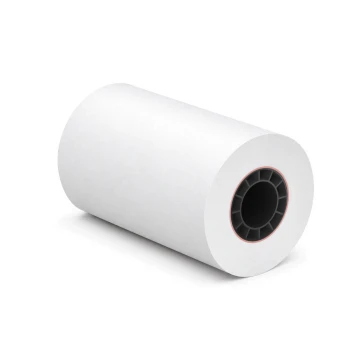
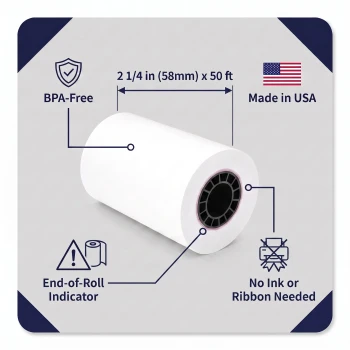
2 1/4 x 50 ft Thermal Paper Rolls | BPA-Free American Made POS Receipt Paper
TerminalDepot
PAX A920Pro Thermal Paper Rolls 2 1/4 x 50 ft | BPA-Free American Made
TerminalDepot


Dejavoo QD2 Thermal Paper Rolls 2 1/4 x 50 ft | BPA-Free American Made
TerminalDepot

Worldline Yomova Thermal Paper Rolls 2 1/4 x 50 ft | BPA-Free American Made
TerminalDepot

Verifone V660p Thermal Paper Rolls 2 1/4 x 50 ft | BPA-Free USA Made
TerminalDepot





