Epson
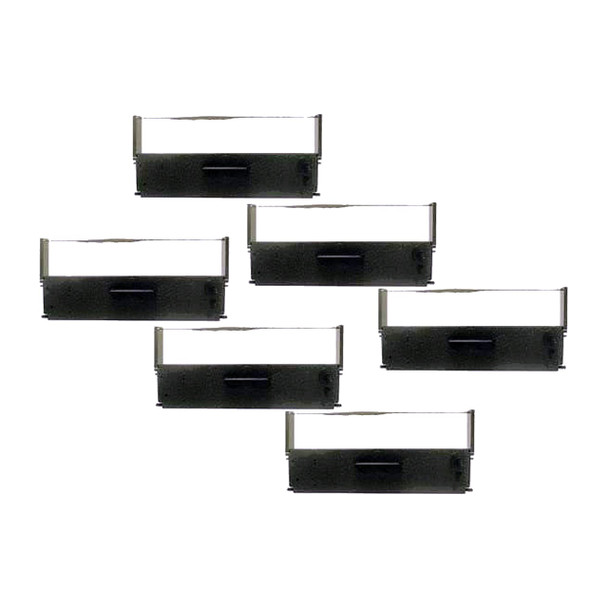
Epson TM-U590 Compatible Ribbon (ERC-31B) | Black or Purple | 6-Pack
- SKU:
- RRERC31B
- MPN:
- ERC-31B
Bulk discount rates
Below are the available bulk discount rates for each individual item when you purchase a certain amount
| Buy 3 - 5 | and get 5% off |
| Buy 6 or above | and get 8% off |


Description
Epson ERC-31B Compatible Ribbon Cassette for TM-U590 Slip Printers - 6-Pack
Direct replacement for the Epson ERC-31B ribbon cassette. Fits the Epson TM-U590 (M128B) and all other ERC-31 compatible slip printers including the TM-U950, TM-H5000, TM-H5200, TM-U925, TM-930, and TM-950. Available in black (ERC-31B) or purple (ERC-31P) - select your color above.
Each 6-pack contains individually sealed ribbon cassettes built from new components. Not re-inked or refurbished. ISO 9001 and ISO 14001 certified manufacturing. 30-day replacement on every cassette.
| Replaces OEM: | Epson ERC-31B (Black) / ERC-31P (Purple) |
| Type: | Fabric Ribbon Cassette |
| Color: | Black or Purple (select above) |
| Pack Size: | 6 ribbon cassettes |
| Condition: | New Compatible (not re-inked or refurbished) |
| Character Yield: | Approximately 5 million characters per ribbon |
| Warranty: | 30-Day Replacement |
| Certifications: | ISO 9001, ISO 14001 |
| SKU: | RRERC31B |
▶ Compatible Printers
The ERC-31 ribbon cassette is compatible with the following Epson printers:
- Epson TM-U590 (M128B)
- Epson TM-U950
- Epson TM-U925
- Epson TM-H5000 (M128A)
- Epson TM-H5000II (M128C)
- Epson TM-H5200
- Epson TM-930 / TM-930II
- Epson TM-950
- Epson TM-925
- Epson M-26SA / M-31PA / M-32SA / M-930
The ERC-31 ribbon also fits several non-Epson printers that use the same cassette form factor, including NCR 7162, NCR 7166, NCR 7452, NCR 7453, and VeriFone Ruby SuperSystem. If your printer currently uses an ERC-31 ribbon (check the cassette label), this is the correct replacement.
▶ ERC-31B vs ERC-31P - Which Do You Need?
| Model: | ERC-31B | ERC-31P |
| Color: | Black | Purple |
| Print Appearance: | Standard black text | Purple text |
| Best For: | Standard receipts, slips, reports | Locations that prefer purple or need copy distinction |
| Physical Size: | Identical | Identical |
Both ribbons are physically identical and fit the same printers. The only difference is ink color. Most businesses use ERC-31B (black). Check your current ribbon - black fabric means ERC-31B, purple fabric means ERC-31P. You can switch between them at any time without changing printer settings.
▶ How to Replace the Ribbon
- Open the printer cover to access the ribbon cassette compartment.
- Grasp the installed ribbon cassette and pull straight up to remove it.
- Remove the new cassette from its sealed packaging.
- Turn the ribbon tension knob in the direction of the arrow printed on the cassette to take up any slack in the fabric.
- Insert the new cassette, aligning the guide posts with the slots in the printer.
- Press down firmly until the cassette clicks into place.
- Close the printer cover.
- Print a test receipt to confirm clean, even output.
No tools required. Do not turn the ribbon knob opposite the arrow direction. This can damage the ribbon fabric.
▶ Compatible vs Re-inked - What Is the Difference?
Compatible (New): Built from all-new components - new ribbon fabric, fresh ink, new cassette housing. Never used before. Manufactured to match OEM specifications.
Re-inked (Refurbished): A used OEM cassette refilled with new ink. The fabric is reused and may have wear. Print quality depends on fabric condition and number of previous re-inkings.
TerminalDepot sells compatible (new) ribbon cassettes only. Every component is new. The ribbon fabric is fresh and unworn, providing maximum print life and consistent darkness from first print to last.
▶ Print Quality and Yield
Each ribbon cassette produces approximately 5 million characters of print output. Actual yield depends on print density, slip length, and how much of each line is printed.
Signs your ribbon needs replacement:
- Printing appears faded or light
- Uneven darkness across the print line
- Characters hard to read on customer copies
- Ribbon fabric visibly worn, dry, or fraying
▶ Troubleshooting
- Faded or light printing? The ribbon is worn out. Replace with a new cassette.
- Dark on one side, light on other? Cassette not seated evenly. Remove and reinsert, making sure it clicks into both guide posts.
- Ribbon jammed or bunched? Do not pull the fabric. Turn the tension knob in the arrow direction to rewind slack. If fabric is torn, replace the cassette.
- Smearing or excess ink? Try a different cassette from the pack. Contact us for warranty replacement if the issue persists.
- Printer shows ribbon error? Remove cassette and check for packaging material or tape still attached. Reinsert firmly. Power cycle the printer.
▶ Storage
Store ribbon cassettes in sealed packaging until ready to install. Keep in a cool, dry location away from direct sunlight. Sealed ribbons have a shelf life of approximately 3-5 years. Once installed, the ribbon lasts until ink and fabric are depleted through normal printing.
▶ Warranty
If a ribbon has a problem within 30 days of your order, contact TerminalDepot for a Return Authorization number. Defective ribbons are replaced at no charge after inspection.
Will this void my printer warranty? No. Under the Magnuson-Moss Warranty Preservation Act (15 U.S.C. 2302), printer manufacturers cannot void your warranty for using compatible ribbons. Your Epson printer warranty remains fully intact.
▶ What Is Included
In the box:
- 6 x Epson ERC-31 compatible ribbon cassettes (black or purple, depending on selection)
- Each cassette individually sealed in protective packaging
NOT included:
- Printer
- Paper rolls (sold separately - we carry compatible bond paper for Epson slip printers)
 Attention CA Residents: Prop 65 Warning
Related Products
Related Products
Epson TM-U950 Compatible Ribbon (ERC-31B) | Black or Purple | 6-Pack
Epson

Epson TM-U950 Bond Paper Rolls
TerminalDepot

Epson ERC-32 Compatible Ribbon | TM-U675/TM-H6000 | 6-Pack
Nectron

Epson TM-U675 Bond Paper Rolls 3 1/4 x 165 ft (50 Rolls) | American Made
TerminalDepot

Epson ERC-39/ERC-43 Compatible Endorsement Ribbon | TM-H6000 | 6-Pack
Epson