
Ingenico
Ingenico Lane 3000/3600/5000/7000/8000 and AXIUM RX Ethernet Socket Cable | OEM CAB350901

- SKU:
- CAB350901
- MPN:
- CAB350901
- Condition:
- New





Description
Ingenico Lane and AXIUM RX Ethernet Socket Cable - OEM Part CAB350901
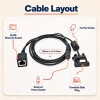
Your Lane terminal is the last stop of every sale. When its network cable fails, the line stops moving and every card gets declined at once. This OEM Ingenico CAB350901 cable restores the wired Ethernet connection your terminal was designed for: plug the multipoint connector into the terminal, snap your network cord into the RJ45 socket, and the lane is back online.
No adapters. No pin-out guesswork. No wondering whether a generic cable will hold up through a Saturday rush. Just the exact 2 meter cable Ingenico built for the Lane and AXIUM RX connector.
Key Features
- ✅ Genuine OEM Ingenico cable - correct pin configuration, so a miswired generic never damages your terminal
- ✅ Fits Lane 3000, 3600, 5000, 7000, 8000 and AXIUM RX5000, RX7000, RX9000 - one cable covers your whole checkout fleet
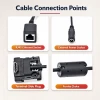
- ✅ Female RJ45 socket end - accepts any standard Ethernet patch cable, so a crushed cord means replacing a cheap patch cable, not this one
- ✅ Built-in power port - your Ingenico power supply connects through the same cable, keeping the counter clear
- ✅ 2 meter (6.5 ft) length - reaches from an under-counter switch to a countertop mount without strain on the connector
- ✅ Also fits legacy iPP 3XX, iSC250, iSC Touch 250, iSC350, and iSC480 - upgrade the terminal without rewiring the lane
Specifications
| OEM Part Number: | CAB350901 |
| Cable Type: | Ethernet socket cable with external power port |
| Length: | 2 meters (6.5 feet) |
| Connects From: | Ingenico multipoint terminal port |
| Connects To: | RJ45 Ethernet socket (female) plus DC power input |
| Signals Carried: | Ethernet data and DC power |
| Compatible Terminals: | Lane 3000, Lane 3600, Lane 5000, Lane 7000, Lane 8000, AXIUM RX5000, AXIUM RX7000, AXIUM RX9000, iPP 3XX, iSC250, iSC Touch 250, iSC480 |
| Condition: | New - OEM Original |
| Brand: | Ingenico |
▶ What Is This Cable and What Does It Do?
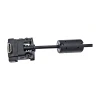
This is Ingenico's 2 meter Ethernet connection cable for the Lane and AXIUM RX terminal families. The terminal end uses Ingenico's proprietary multipoint connector. It is shaped like an HDMI plug but it is not an HDMI video cable - never connect it to a TV or monitor. The other end carries a female RJ45 socket for your network cord and a DC input for your Ingenico power supply, so one cable run delivers both data and power to the terminal.
▶ When Do You Need This Cable?
• Your original Ethernet cable was lost during a counter remodel or terminal swap.
• The connector is cracked or the cable is kinked and the terminal keeps dropping off the network.
• You are adding a new checkout lane and the terminal arrived without a connection kit.
• You are moving a terminal from WiFi or dial to a hardwired Ethernet connection for faster, more reliable authorizations.
▶ Which Ingenico Terminals Does It Fit?
Ingenico uses one multipoint connector across these families and confirms that Lane series cables carry over to AXIUM RX.
Lane Series:
• Lane 3000
• Lane 3600
• Lane 5000
• Lane 7000
• Lane 8000
AXIUM RX Series:
• AXIUM RX5000
• AXIUM RX7000
• AXIUM RX9000
Legacy iSC and iPP Series:
• iPP320 / iPP350
• iSC250 / iSC Touch 250
• iSC350 / iSC480
Retiring an iSC and installing a Lane? The cable already at the counter position can stay.
Does not fit: Move series (wireless) or Desk series terminals - those use different connection hardware.
▶ What's Included and What's Not
Included: one OEM Ingenico CAB350901 cable, new condition.
Not included: the power supply and the RJ45 network patch cable. If you need the power supply, it is available separately on our site. Any standard Ethernet patch cord plugs into the socket end.
▶ Troubleshooting - Terminal Not Connecting
• No network: confirm the patch cord clicks firmly into the RJ45 socket and the link light shows at your switch.
• Terminal has no power: this cable passes power from an external Ingenico power supply through its DC port. Confirm the supply is connected to the cable and the outlet.
• Intermittent drops: inspect the multipoint connector for bent contacts and reseat it at the terminal. Route the cable away from pinch points under the counter.
• Still down after swapping the patch cord: test the terminal port with a known-good cable before replacing the terminal.
▶ Why Use an OEM Ingenico Cable?
The multipoint connector carries data and power on precise pin assignments. An OEM cable guarantees the correct pin-out and voltage path, full compatibility with every Lane and AXIUM RX firmware version, and a connector molded to Ingenico's own tolerances so it seats and stays seated. That protects the terminal, which costs many times more than the cable.
 Attention CA Residents: Prop 65 Warning
Related Products
Related Products

Genuine Ingenico OEM Power Supply 296196003 | Lane, iPP, iSC
Ingenico

Ingenico Lane 3000/3600/5000/7000/8000 & AXIUM RX Ethernet Cable w/ External Power Port | OEM 296114829AD
Ingenico

Ingenico Lane 3000/3600/5000/7000/8000 & AXIUM RX Powered USB Cable | 6ft OEM (296111170AD)
Ingenico

Ingenico Lane 3000 / 5000 / 7000 / 8000 to External Powered USB Cable (13')
Ingenico

Ingenico Lane 3000 / 5000 / 7000 / 8000 to Ethernet Cable (13ft)
Ingenico

Ingenico Lane 3000 / 5000 / 7000 / 8000 Cable to RS232 (DB9)
Ingenico





