
Ingenico
Ingenico Link 2500 Battery | 1200 mAh 3.6V OEM Li-ion | 296203895AC
- SKU:
- 296203895AC
- MPN:
- 296203895AC






Description
Ingenico Link 2500 Battery: 1200 mAh OEM Li-ion Pack, Part 296203895AC
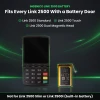
When a Link 2500 dies in the middle of a lunch rush, your servers walk back to the counter to run cards and the tableside checkout stops. This genuine Ingenico battery, part 296203895AC, replaces the removable 1200 mAh pack in the Link 2500 Standard, Touch and Dual Magnetic Head models.
Unclip the trapdoor, plug in the connector, close the cover and charge. Fast shipping.
Key Features
- ✅ Genuine Ingenico OEM battery, with the Ingenico mark printed right on the cell label
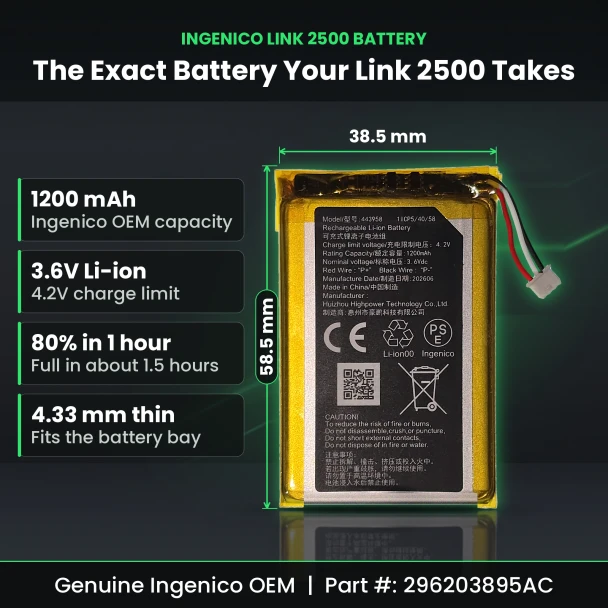
- ✅ 1200 mAh rechargeable Li-ion, the capacity Ingenico lists for the Link 2500 removable pack
- ✅ Reaches 80% in about 1 hour and a full charge in about 1.5 hours on the terminal's own USB-C power supply, per Ingenico
- ✅ Swaps in by hand: the pack plugs into the connector beside the battery bay, no technician needed
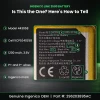
- ✅ Label numbers 443958 and 1ICP5/40/58 let you check your old battery against this one before you order
- ✅ Ingenico's user guide calls for an Ingenico-approved battery in the Link 2500, and this is one
Specifications
| OEM Part Number: | 296203895AC |
| Brand: | Ingenico |
| Compatible Terminals: | Ingenico Link 2500 Standard, Touch and Dual Magnetic Head |
| Battery Type: | Rechargeable Li-ion |
| Rated Capacity: | 1200 mAh |
| Nominal Voltage: | 3.6V |
| Charge Limit Voltage: | 4.2V |
| Energy: | 4.32 Wh |
| Cell Model: | 443958 (1ICP5/40/58) |
| Connector: | 3-wire plug on a short lead |
| Dimensions: | 58.5 x 38.5 x 4.33 mm (2.30 x 1.52 x 0.17 in) |
| Charge Time: | 80% in about 1 hour, full in about 1.5 hours |
| Charging Temperature: | 0 to 40°C (32 to 104°F) |
| Condition: | New |
▶ Which Link 2500 Models Use This Battery
✅ Fits
• Ingenico Link 2500 Standard
• Ingenico Link 2500 Touch
• Ingenico Link 2500 Dual Magnetic Head
All three have a battery trapdoor on the back.
❌ Does Not Fit
• Link 2500 Slim: its battery sits inside the housing and is not user-replaceable
• Link 2500i (Integration version): its battery sits inside the housing and is not user-replaceable
• Move 2500: a different terminal despite the similar name
▶ How to Replace the Link 2500 Battery
1. Switch the terminal off.
2. Turn the terminal over and unclip the battery trapdoor by pushing on its button.
3. Lift the old pack out and pull its connector gently away from the housing.
4. Plug the new pack's connector in, following the keyed shape, and check that it locks.
5. Seat the pack in the compartment and close the trapdoor.
6. Connect the power supply to the USB-C port on the right side and charge.
Tip: do not power the terminal or connect the supply while no battery is installed.
▶ Charging a New Battery
• Give the new pack a full 4-hour charge on first start-up, as Ingenico's user guide directs.
• After that, expect about 80% in 1 hour and a full charge in about 1.5 hours.
• Charge between 0 and 40°C. Between 15 and 25°C is best, away from radiators, direct sun and closed hot spaces.
• A flashing or moving battery symbol on the screen means it is charging.
▶ Signs Your Battery Needs Replacing
• The terminal shuts off as soon as it leaves its base or charger.
• The battery runs down well before the end of a shift that it used to finish.
• The pack looks swollen or no longer sits flat in the bay. Stop using it and replace it.
▶ Match Your Old Battery Label
Flip your current pack over and compare its label with ours before you order:
• Model: 443958
• Cell code: 1ICP5/40/58
• Rating: 1200 mAh, 3.6V nominal, 4.2V charge limit
• Mark: Ingenico
▶ What's Included
• 1 Ingenico Link 2500 battery, part 296203895AC
• Not included: power supply or USB-C cable. Use the one that came with your terminal.
 Attention CA Residents: Prop 65 Warning
Related Products
Related Products

VeriFone V400M Battery Pack | 7.4V Li-Ion OEM Replacement (BPK475-001-01-A)
VeriFone

Ingenico iSMP 4 Battery
Ingenico

Ingenico iWL220 / iWL250 / Move 3500 Battery
Ingenico

Ingenico Move 2500 Coreless Paper (50 Rolls)
TerminalDepot

Ingenico Move 3500 / Move 5000 Battery Pack
Ingenico





