
TerminalDepot
Veeder Root TLS-300 / TLS-300C Thermal Paper Rolls 2 1/4 x 85 ft | BPA-Free American Made

- SKU:
- PPRVRTLS300
- MPN:
- PPRVRTLS300
- Condition:
- New





Description
Thermal Paper for the Veeder Root TLS-300 and TLS-300C: 2 1/4 in (58mm) x 85 ft Rolls
Thermal paper for the Veeder Root TLS-300 and TLS-300C runs 2 1/4 in (58mm) wide, and our standard roll for it holds 85 ft. Sites that would rather open the printer less often can order the 165 ft roll, which comes in a 50-roll case.
The printer on a TLS-300 can sit untouched for days. Then someone needs an inventory report or a leak test result, and an empty roll means nothing comes out. Replacement rolls kept in the office keep that from happening.
Key Features
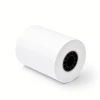
- ✅ Sized for the printer option on Veeder Root TLS-300, TLS-300C and TLS-300i consoles: 2 1/4 in (58mm) wide and 1.77 in (45mm) across on a 1/2 in core
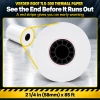
- ✅ A warning indicator near the end of each roll puts a red stripe on the printout, the signal Veeder-Root's manual gives for changing the roll
- ✅ Heat does all the printing, so reports come out dark and sharp with no ribbon or ink to keep around
- ✅ BPA-free coating on every report your staff tears off and files
- ✅ American-made to one spec, so a case bought next spring matches the one in your office today
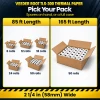
- ✅ 85 ft rolls in packs of 6 to 50, plus a 165 ft roll by the case that holds nearly twice the paper
Specifications
| Compatible Models: | Veeder Root TLS-300, TLS-300C, TLS-300i |
| Paper Size: | 2 1/4 in (58mm) x 85 ft, or 2 1/4 in (58mm) x 165 ft |
| Paper Type: | Thermal |
| Roll Diameter: | 1.77 in (45mm) across for 85 ft, 2.35 in (60mm) across for 165 ft |
| Core: | 1/2 in |
| Paper Thickness: | 2.1 mil (85 ft roll) |
| Paper Weight: | 48 gsm, standard thermal weight (85 ft roll) |
| End-of-Roll Indicator: | Yes |
| BPA-Free: | Yes |
| Made In: | United States |
| Pack Sizes: | 85 ft: 6, 12, 18, 24 or 50 rolls. 165 ft: 50-roll case |
▶ Which Consoles and Rolls Fit
✅ Veeder Root TLS-300
✅ Veeder Root TLS-300C
✅ Veeder Root TLS-300i
Veeder-Root's TLS-3XX operator's manual covers all three consoles and gives a single paper-changing procedure for the printer. The printer itself is an option, so check the console front for a printer cover before you order. No printer cover means no built-in printer and no roll to replace.
Veeder-Root's manuals give 514100-328 as the replacement paper roll for these consoles, and these rolls replace it:
• ✅ 2 1/4 in x 85 ft on a 1/2 in core: this roll, in packs of 6 to 50
• ✅ 2 1/4 in x 165 ft on a 1/2 in core: 2.35 in (60mm) across, sold by the 50-roll case
❌ Veeder Root TLS-450, TLS-450 Plus and TLS4: these consoles take 3 1/4 in wide rolls, and Veeder-Root names a separate paper part for them (514100-456). Our rolls for those consoles:
• Veeder Root TLS-450 Paper 3 1/4 x 85 ft
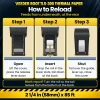
▶ How to Change the Printer Paper on a Veeder Root TLS-300, TLS-300C or TLS-300i
- Lift the printer cover and press the paper feed release lever down.
- If printed reports are wound on the take-up spool, tear the paper off close to the feed roller, pull the spool out and pull its two halves apart. Keep those reports: Veeder-Root's manual says not to throw them away.
- Lift out the old roll and any loose paper. Slide the roll shaft out of the empty core and press it into the new roll.
- Push the new roll into the lower slots so the paper tail hangs down at the back of the roll.
- Bring the tail up over the paper guide and down behind the feed roller.
- To collect reports on the spool, clamp the tail between the spool halves until they click, push the spool into the upper slots and turn it counterclockwise until the slack is gone. To let reports feed out instead, thread the tail through the slot in the printer cover.
- Push the release lever back up and close the cover.
Blank page after a reload? Take the roll out, turn it so the tail leaves from the bottom at the back, and feed it again.
▶ Printer Messages and Print Problems
• Display reads PRINTER ERROR: the feed roller release lever is down. Veeder-Root's manual says to push it up; it sits under the lower right corner of the printer cover.
• Display reads PAPER OUT: the roll is finished. Put in a fresh one using the steps above.
• Blank paper coming out: the heat-sensitive side faces away from the print head. Turn the roll around.
• Light gray or faint print on a brand-new roll: the print head has picked up residue from earlier paper. Clean it with rubbing alcohol on a lint-free rag or a cotton ball and give it a minute to dry before the next report.
• Overprinted, unreadable lines: Veeder-Root's troubleshooting guide points to a roll loaded on the take-up spool. Move the roll to the lower slots.
• Cover won't close all the way: the roll is sitting outside the lower slots, or it is too large across for the printer.
▶ What BPA-Free Means for Your Reports
The print on a thermal report comes from a coating that darkens with heat, and some coatings use BPA to make that image. Ours is BPA-free. That matters when the same people pull, read and file these reports week after week.
▶ Made in the United States to One Spec
These rolls are produced in the United States to a single spec. Order six today and fifty next year and the roll that goes into the printer is the same: same width, same coating, same 85 ft.
▶ Storing Spare Rolls and Old Reports
Keep spare rolls in their original packaging, in a dry room that stays cool. Heat, sunlight and solvents can darken thermal paper before it ever reaches the printer, so skip the shelf beside a compressor or a sunny window. As for the printouts, Veeder-Root's manual tells sites to keep the inventory, alarm and leak test reports that collect on the take-up spool rather than discard them.
▶ How Many Rolls to Order
Report length varies from site to site, so a roll does not hold a fixed number of reports. Pick a pack by how often your console prints and how many spares you want nearby.
• 6 rolls: spares for one console, kept close for the day the stripe shows up
• 12 or 18 rolls: a deeper stock at a lower price per roll
• 24 rolls: fewer reorders for a console that prints most days
• 50-roll case: the lowest price per roll on the 85 ft size
• 165 ft case: nearly twice the paper in every roll, so the cover stays shut longer between changes
Not sure where to start? A 12-roll pack is an easy first order, and the 50-roll case costs the least per roll once you know your usage.
 Attention CA Residents: Prop 65 Warning
Related Products
Related Products
Veeder Root TLS-350 / TLS-350 Plus / TLS-350R Thermal Paper 2 1/4 x 85 ft | BPA-Free American Made
TerminalDepot


Veeder Root TLS-450 / TLS-450 Plus Thermal Paper Rolls 3 1/4 x 85 ft | 50 Rolls | BPA-Free American Made
TerminalDepot

Veeder Root Encore 700 S Thermal Paper Rolls 2 5/16 x 400 ft | BPA-Free American Made
TerminalDepot

Epson TM-T70II / TM-T70 Thermal Paper Rolls 3 1/8 x 230 ft | BPA-Free American Made
TerminalDepot





