
Digital Check
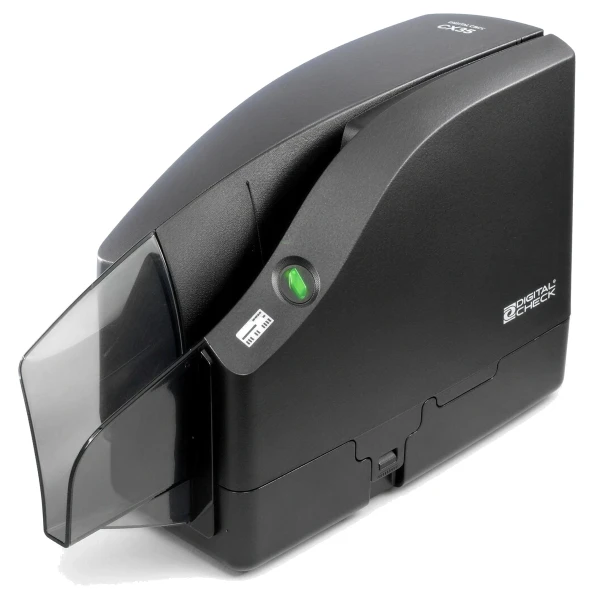
Digital Check CheXpress CX35 Check Scanner with Inkjet Endorser | 157000-02
- SKU:
- 157000-02
- MPN:
- 157000-02
- Condition:
- New


Description
Digital Check CheXpress CX35 Check Scanner with Inkjet Endorser
Your bank gave you remote deposit, then the scanner they sent you stopped working or never showed up. The CheXpress CX35 is the scanner most banks and RDC software providers build around: feed one check, it scans both sides, reads the MICR line, prints your endorsement on the back, and drops the check in the exit tray. Part number 157000-02 is the inkjet endorser model, which is the version most deposit programs require.
No more driving deposits to the branch. No more waiting on funds because the mail is slow. Just a bank-grade scanner on your desk that clears checks the day they arrive.
Key Features
- ✅ Single-line rear inkjet endorser prints your deposit endorsement on every check, so nothing goes back to the bank unstamped
- ✅ Dual 600 dpi image sensors capture both sides in one pass, cutting the misread rejects that send you back to rescan
- ✅ MICR reading with OCR backup verification, so a smudged routing line still reads correctly
- ✅ Smart Button with color status light tells you at a glance whether the scanner is ready, busy, or needs cleaning
- ✅ Automated cleaning mode runs a cleaning card through the transport by itself, no disassembly
- ✅ Direct successor to the CX30, so software that ran the CX30 typically runs the CX35 with a driver update
- ✅ USB 2.0 cable, power supply, and one ink cartridge in the box
Specifications
| Software: | Remote deposit capture applications that support the Digital Check API (confirm CX35 support with your bank or software provider) |
| Part Number: | 157000-02 (CX35-IJ) |
| Feed Type: | Single feed, 1 item entry, up to 5 items in exit tray |
| Scan Speed: | Up to 30 documents per minute |
| Image Resolution: | 600 dpi, dual sensors, tri-color LED |
| MICR / OCR: | E13B and CMC7 MICR with OCR verification |
| Endorser: | Rear single-line inkjet, 96 dpi, user-programmable text |
| Ink Cartridge: | Digital Check MS0083 / HP C6602A |
| Scan Modes: | Scan and return, park and return, scan into exit pocket |
| Document Size: | 2.12 to 4.25 in high, 3.19 to 8.98 in long |
| Connectivity: | USB 2.0 |
| Operating System: | Windows 11 / 10; macOS via Digital Check API |
| Power: | 24 W, 100-240 VAC auto-sensing external supply |
| Dimensions: | 7.47 in H x 3.92 in W x 9.38 in L |
| Weight: | 3.72 lb |
| Warranty: | 1 year Digital Check limited warranty |
| Condition: | New |
| Brand: | Digital Check |
▶ CX30 vs CX35: What Changed
The CX35 replaces the CheXpress CX30, which Digital Check has discontinued. Same single-feed design, same footprint on the desk, same remote deposit job.
• Image sensors went from 300 dpi to 600 dpi, four times the raw resolution
• Smart Button with a color status light replaces the plain power button
• Automated cleaning mode added
• Endorser cartridge is unchanged: MS0083 / C6602A fits both
If your software provider certified the CX30, ask them to confirm the CX35 driver. Most major RDC platforms already list it.
▶ Will It Work With My Bank
The CX35 is a hardware scanner. Your bank or remote deposit software provider supplies the application that runs it, and that application has to list the CX35 (or the CheXpress line) as supported.
• Before ordering, check your RDC software's supported scanner list or ask your bank's treasury contact
• The 157000-02 inkjet model is the one most programs specify, because many banks require a printed endorsement
• If your bank requires a franker (red ink stamp on the front) instead of an inkjet endorser, that is a different CX35 part number - contact us before ordering
▶ What Is Included
• CheXpress CX35 scanner, inkjet endorser model
• USB 2.0 cable
• External power supply, 100-240 VAC
• One MS0083 black ink cartridge installed
• Quick start guide
❌ Not included: remote deposit software (supplied by your bank or provider), cleaning cards, franker roller.
▶ Setup and First Scan
• Install the driver or application your bank provides, then connect the USB cable and power supply
• Press the Smart Button to power on; the status light shows ready
• Feed one check face up into the entry slot; the scanner pulls it through, images both sides, endorses, and drops it in the rear tray
• Program your endorsement text once inside the deposit application; it prints on every check after that
▶ Cleaning and Ink Replacement
Check dust and ink residue build up on the sensors and rollers. Digital Check recommends a cleaning card every few hundred checks or whenever the status light asks for it.
• Press and hold the Smart Button to enter cleaning mode, insert a cleaning card, and the scanner runs it back and forth on its own
• Replace the endorser cartridge when endorsements fade; it is a snap-in MS0083 / C6602A cartridge, no tools
• Keep the exit tray clear; more than 5 checks in the tray will jam the next one
▶ Troubleshooting
• Check will not feed: check for a bent corner or staple, and make sure the previous check cleared the exit tray
• MICR misreads on good checks: run a cleaning card; dirty sensors are the usual cause
• Endorsement not printing: reseat the cartridge and confirm endorsement text is enabled in your deposit application
• Scanner not detected: try a different USB port directly on the PC, not through a hub, and confirm the driver installed
• Status light stays red: unplug power for 10 seconds and restart; if it persists, contact Digital Check support under warranty
 Attention CA Residents: Prop 65 Warning
Related Products
Related Products

Digital Check TellerScan TS250-55 Check Scanner with Inkjet Endorser | 158000-72
Digital Check

Digital Check TellerScan TS250-75 Check Scanner with Inkjet Endorser | 158000-52
Digital Check

Digital Check Inkjet Cartridge C6602A / MS0083 | CX35, CX30, TS250, TS240
Digital Check

Bill Check Receipt Presentation Folder
TerminalDepot
Ingenico EnCheck 2600 Inkjet Cartridge
Ingenico





